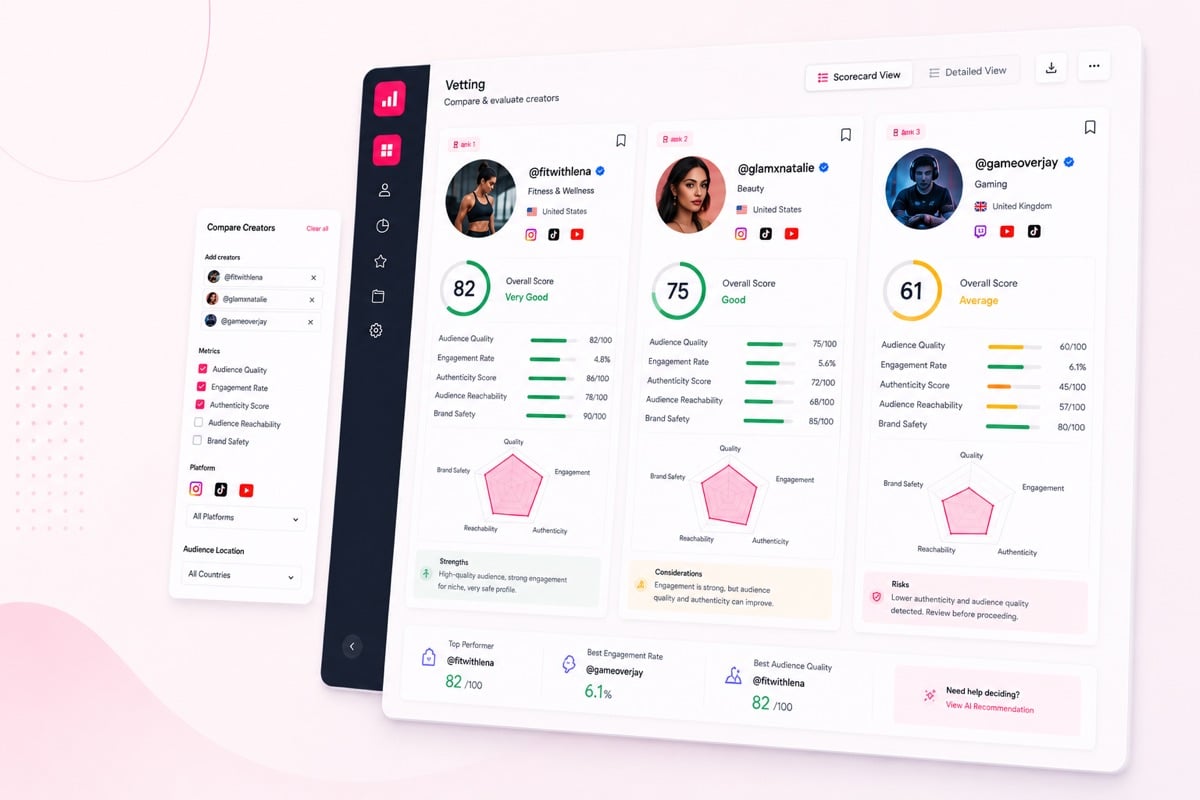
Fake Follower Checker forAny Instagram, TikTok, or YouTube Creator

Check any public Instagram, TikTok, or YouTube handle, scan a follower sample, and estimate the fake follower percentage before you spend. ClickAnalytic helps detect bot accounts and flag suspicious followers fast.

Brand Teams
Agencies
Influencer Teams

No credit card · 4.8 on Capterra and G2

Creator authenticity review

Fake followers, bot detection, engagement gaps, and suspicious growth signals in one workflow.

Fake
Followers
Bot
Detection
Risk
Signals
★★★★★Capterra4.8
★★★★★G24.8

“ClickAnalytic helped us cut wasted creator spend by 31% in one quarter by flagging suspicious audience quality before contracts were signed.”
Growth Lead, DTC Beauty Brand

Your creator data is handled securely with encrypted connections, controlled account access, and SaaS-grade privacy practices.

i

What this page is for

Use the right ClickAnalytic tool for each stage of your creator workflow.

Right page

Single follower-authenticity check for any creator. Detect bots, flag suspicious followers, and read the fake-follower percentage in plain language.

Looking for…

Fake followers distort campaign forecasts, inflate creator fees, weaken reporting, and make performance harder to explain. ClickAnalytic helps your team move from guesswork to repeatable fake follower detection across creator shortlists.

!

Bot-Like Patterns

Flag accounts with suspicious behavior, incomplete profiles, and low-quality signals.

S

Sudden Growth

Review unexplained follower jumps before creator spend is committed.

C

Comment Quality

Spot repetitive, generic, or irrelevant comments that reduce confidence.

E

Engagement Gaps

Compare followers, likes, comments, and views for authenticity risks.

L

Location Mismatch

Check whether audience location aligns with content, language, and market.

T

Timing Spikes

Review unusual bursts of likes or comments after content is posted.

F

Follower Gaps

Find gaps between audience size and real response quality.

G

Growth Cycles

Review repeated growth and drop-off cycles before shortlisting creators.

Snippet-ready answer

A fake follower checker helps identify suspicious followers, abnormal audience growth, and engagement patterns that may point to fake or low-quality followers.

Use ClickAnalytic when your team needs paid, workflow-ready fake follower detection for Instagram, TikTok, and YouTube creator review before campaign planning begins.

When to use this fake follower workflow

Use ClickAnalytic when your team needs to review fake followers, authenticity, bot detection, comment quality, growth spikes, and follower-to-engagement gaps before outreach or contracts. This keeps budget decisions focused on risk, not follower count alone.

Fake follower check result with Authentic vs Suspicious donut, follower-breakdown stacked bar, and detected-signal bullet list

Why fake followers waste your campaign budget

Fake followers make a creator look larger than their real audience. That can inflate fees, distort reach forecasts, and send product to people who will never buy. A fast fake-follower check helps you detect obvious audience problems before budget moves.

  • Check audience authenticity: Spot profiles where the follower count looks stronger than the real audience behind it.
  • Flag suspicious followers: Find bot accounts and inauthentic accounts that may dilute campaign performance.
  • Measure followers clearly: Do not measure followers by count alone; review follower quality before you plan spend.

“A creator can look strong from the outside while hiding suspicious audience quality. Fake follower detection helps teams review risk before spend begins.”
Influencer Strategy Team

How ClickAnalytic detects fake and bot followers

ClickAnalytic scans public creator data to estimate the fake follower percentage and detect bot accounts. The tool focuses on follower authenticity, not a full creator review, so your team gets a quick answer to one question: does this audience look real?

1
Inspect follower list patterns

Review audience signals that may point to automation or empty profiles.

2
Flag suspicious followers

Mark unusual audience patterns for closer review.

3
Expose inflated reach

See when a high follower count may hide weak audience authenticity.

4
Check key platforms

Run the same quick scan for Instagram, TikTok, and YouTube creators.

Workflow scenario: A skincare team reviews 120 TikTok and Instagram creators before outreach. The team compares suspicious growth, follower-to-engagement gaps, comment quality, and authenticity signals before deciding which creators should move forward.

1
Add Creators
Upload, import, or organize creators for a campaign or client
2
Run Detection
Review fake followers, bot signals, and suspicious growth
3
Compare Risk
See which profiles need deeper review or removal
4
Choose Better Partners
Move stronger creators into outreach and planning

Run a fake-follower check on any public creator handle

Paste a public creator handle and scan it before outreach, gifting, or paid content. The fake follower checker gives marketers a standalone way to check follower quality without building a full campaign workflow first.

  • Check one handle fast: Use it when a creator looks popular but you need a quick authenticity read.
  • Estimate fake followers: Get a practical view of likely inauthentic accounts in the audience.
  • Flag before outreach: Remove obvious mismatches from your shortlist early.
  • Go deeper when needed: For a full creator audience review before outreach, use Influencer Analytics.
SignalPlatformCreator ACreator BMarketFormatDecision
Fake follower risk
Authenticity context
InstagramHighLowUSReelsReview before spend
Engagement gapTikTokLargeSmallCanadaShort videoCompare response quality
Growth spikeYouTubeSuddenSteadyNorth AmericaLong-formCheck growth source
Comment qualityInstagramGenericRelevantUnited StatesCarouselAssess authenticity
Bot detectionTikTokFlaggedClearerCanadaVideoPrioritize stronger profile

Free check vs paid workflow

A free single-profile check is useful when you want to inspect one creator quickly. ClickAnalytic is built for teams that need batch fake follower detection, creator comparison, and workflow-ready risk review across many profiles.

For quick scans, try the free Instagram fake follower checker, free TikTok fake follower checker, or free YouTube fake subscriber checker. For broader approval workflows, use influencer vetting.

Read the fake-follower percentage in plain language

The fake follower percentage helps you understand how much of a creator’s audience may be low quality, automated, or inauthentic. Instead of guessing from follower count alone, you can inspect follower list signals and read the result in simple terms.

  • Low percentage: Fewer warning signs in the follower sample, though campaign fit still matters.
  • Medium percentage: Some suspicious followers appear, so check context before you continue.
  • High percentage: Bot accounts or inauthentic accounts may be a major part of the audience.
  • Plain output: Use the result to expose inflated popularity and protect budget.
Fake-follower percentage gauge showing 19% fake and 81% authentic with 3 detection-signal pills

How the fake follower checker works

The checker looks at a follower sample and related public patterns to estimate audience authenticity. It is built for a fast, single-signal check, so teams can detect and flag fake followers without running a broader creator workflow.

  • Scan: Review available public profile and audience patterns.
  • Detect: Look for bot accounts, empty profiles, and suspicious followers.
  • Estimate: Turn the scan into a fake follower percentage your team can read quickly.
  • Act: Keep checking creators one by one, or use the Influencer Vetting Tool for broader collaboration review.

Fake Follower Checker vs Influencer Vetting Tool

Row Fake Follower Checker Influencer Vetting Tool
Stage Fast first check on a public handle. Broader review before paid creator work.
Output Fake follower percentage plus flags for bot accounts and suspicious followers. Creator rating with wider campaign and brand-fit context.
Inputs Public handle, follower sample, and follower quality patterns. Audience, content, growth, engagement, and campaign context.
When to use Use when you need to scan and detect inauthentic accounts quickly. Use when your team needs a deeper creator review. Visit the Influencer Vetting Tool.
1

Add

Upload, import, or organize the creators you want to review.

2

Check

Review fake followers, suspicious audience signals, and bot detection patterns.

3

Compare

Compare risk across creators and identify profiles that need deeper review.

4

Decide

Use authenticity signals to support outreach, negotiation, planning, or removal.

Use the right workflow: Use Fake Follower Checker for paid, batch fake follower detection, authenticity review, and bot detection before campaign spend. Use Influencer Tracking for campaign measurement, live post collection, and performance reporting.

Use Influencer Relationship Workflows for active partnership steps after creators move beyond early review. Use Influencer Database, Influencer Discovery Platform, or Find Influencers to source creators before fake follower review.

FAQ

Can I check Instagram, TikTok, and YouTube creators?

Yes. Use the fake follower checker to scan public creator handles across Instagram, TikTok, and YouTube.

What does the fake follower percentage mean?

It is an estimate of the audience share that may include bot accounts, suspicious followers, or inauthentic accounts.

Can this detect every fake follower?

No tool can prove every account is real or fake. ClickAnalytic helps flag patterns that deserve attention before spend.

When should I use Influencer Analytics?

Use Influencer Analytics when you want to audit one creator’s audience before outreach.

Answers to common questions about fake follower detection, authenticity signals, bot detection, and workflow-ready creator review.

What is a fake follower checker?
A fake follower checker is a tool that helps identify suspicious followers, abnormal audience growth, and engagement patterns that may indicate fake or low-quality followers.

ClickAnalytic’s fake follower checker is built for paid influencer programs where teams need to review multiple creators, compare risk, and use the results inside a workflow.

How accurate is the fake follower detection?
Fake follower detection is based on probability and signal analysis, not a single absolute number. ClickAnalytic reviews multiple indicators such as engagement anomalies, follower growth patterns, bot-like behavior, audience mismatches, and comment quality.

This multi-signal approach gives teams a more reliable risk view than checking one metric manually.

Does this work for Instagram, TikTok, and YouTube?
Yes. ClickAnalytic supports fake follower checks across major creator platforms including Instagram, TikTok, and YouTube.

If you only need a quick single-profile scan, you can also use the free Instagram fake follower checker, free TikTok fake follower checker, or free YouTube fake subscriber checker.

How is the paid version different from the free Instagram tool?
The free Instagram tool is designed for a single-profile fake follower check. The paid ClickAnalytic fake follower checker is designed for workflow, batch analysis, and integrated creator management.

It is better suited for teams that need to review many creators, compare risk across shortlists, and connect detection to campaign operations.

Can I check multiple creators at once?
Yes. ClickAnalytic is built for teams that need batch fake follower detection across multiple creators.

You can review profiles in a structured workflow instead of checking one creator at a time and manually transferring results into spreadsheets.

What signals show a creator has fake followers?
Common signals include sudden follower spikes, low engagement compared with audience size, repetitive comments, bot-like follower profiles, unusual engagement timing, location mismatches, and audience growth that does not align with content performance.

ClickAnalytic combines these signals to help your team understand creator risk before spending budget.

Can teams reuse saved creator lists?
Yes. Teams can use saved creator lists to keep fake follower detection connected to campaign planning, shortlisting, and creator management.

This helps teams review authenticity consistently instead of restarting checks for every campaign.

Can I search creators by tag, list, or contact detail?
ClickAnalytic helps teams organize creators in a workflow so fake follower checks can be connected to shortlists, campaign planning, and relationship context.

If your team still needs to source creators first, start with Find Influencers or the Influencer Database.

Check a creator’s follower authenticity now

Before you pay for reach, check whether the audience behind a creator looks real. ClickAnalytic helps you scan a public handle, estimate the fake follower percentage, detect bot accounts, and flag suspicious followers in a simple workflow.

  • Use it for: quick creator checks, shortlist cleanup, and follower quality review.
  • Best fit: marketers who need a fast read on audience authenticity before campaign spend.

Start Free Trial Book a Demo

Fake followers can drain budget, distort reporting, and weaken campaign performance. ClickAnalytic helps your team run fake follower checks across multiple creators inside a workflow built for influencer programs.

Fake follower detection workflow

Fake followers, authenticity, bot detection, risk comparison, and creator quality review before spend.

★★★★★
Capterra 4.8
★★★★★
G2 4.8
Curved arrow pointing to the request demo button

No credit card · 4.8 on Capterra and G2

Trusted by marketing teams, agencies, and growing brands

Secure, structured fake follower checks for modern creator marketing teams.