YouTube Email Finder forChannel About Pages and Business Inquiries
Extract public YouTube business email details from channel About pages, then pull, copy, and export contact records for outreach. Use ClickAnalytic to look up known channels after your creator set is already defined.
Agencies
Affiliate Teams
No credit card · 4.8 on Capterra and G2
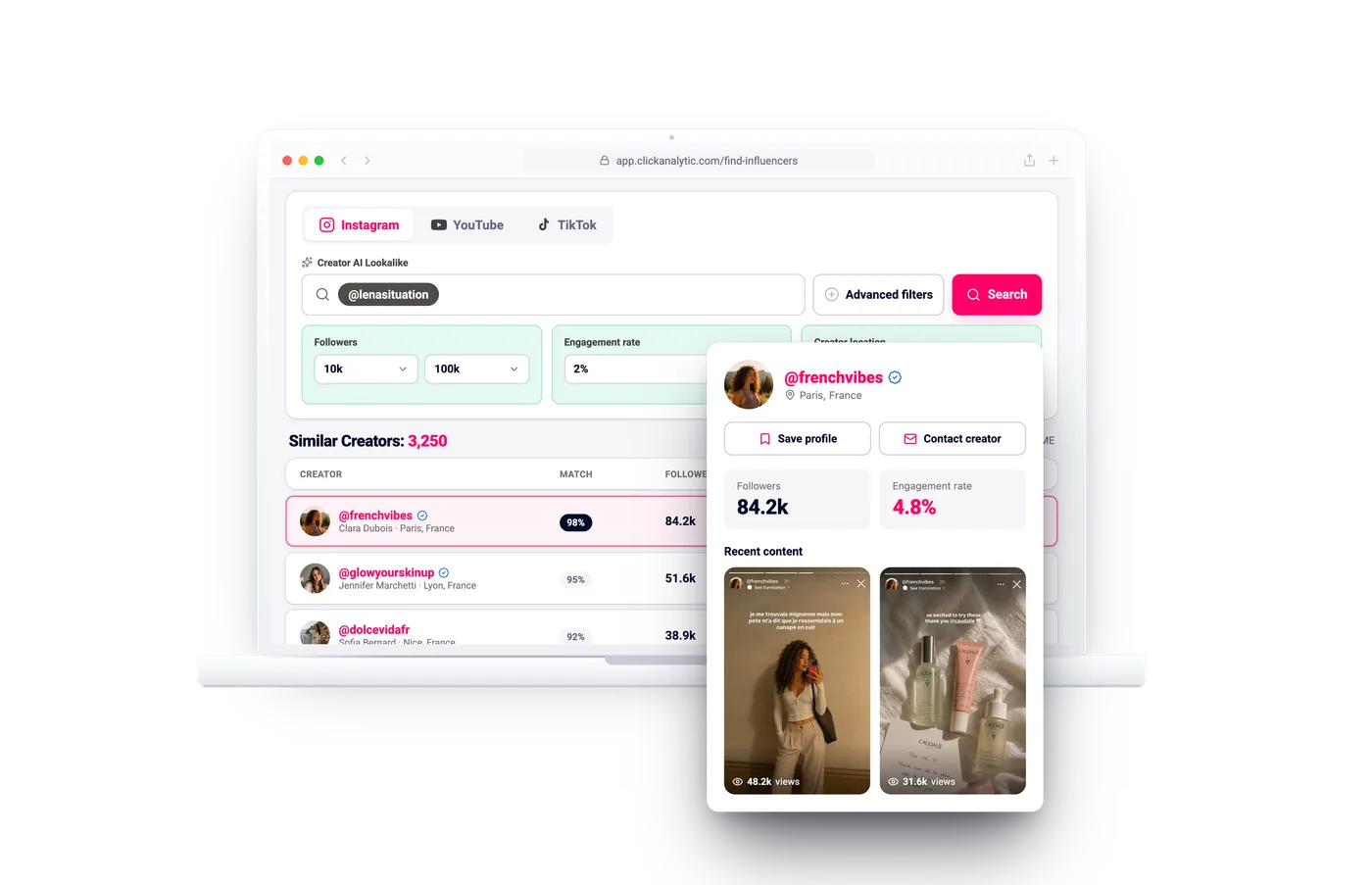
Discover YouTube creators, review fit, collect available public business emails, and build outreach lists.
Emails
Contact
Lists
“ClickAnalytic helped us turn creator contact research into outreach-ready lists without rebuilding spreadsheets for every campaign.”
Growth Marketing Lead
YouTube creator contact data · Outreach lists · G2 and Capterra reviewed
What this page is for
Use the right ClickAnalytic tool for each stage of your creator workflow.
YouTube contact lookup after discovery. Extract business-inquiry emails from YouTube channel About pages in bulk for outreach lists.
- Pull from IG profile contact button? Go to Instagram Email Finder
- Pull from TikTok bios + linktree? Go to TikTok Email Finder
- Search creator universe first? Go to Influencer Search Tool
A YouTube email finder helps influencer teams find public creator contact details without losing hours opening channels, checking About pages, reviewing linked sites, and copying data into spreadsheets.
ClickAnalytic connects email discovery to the full creator outreach process: discover, vet, shortlist, export, and manage relationships.
Public Creator Email Discovery
Identify available business emails connected to YouTube creators and their public channels.
YouTube Creator Discovery
Discover creators by niche, location, keywords, audience, and campaign criteria.
Creator Channel Review
Check channel details before adding a creator to an outreach list.
Audience and Fit Signals
Review data points that help you decide whether a creator matches your brand.
Shortlists
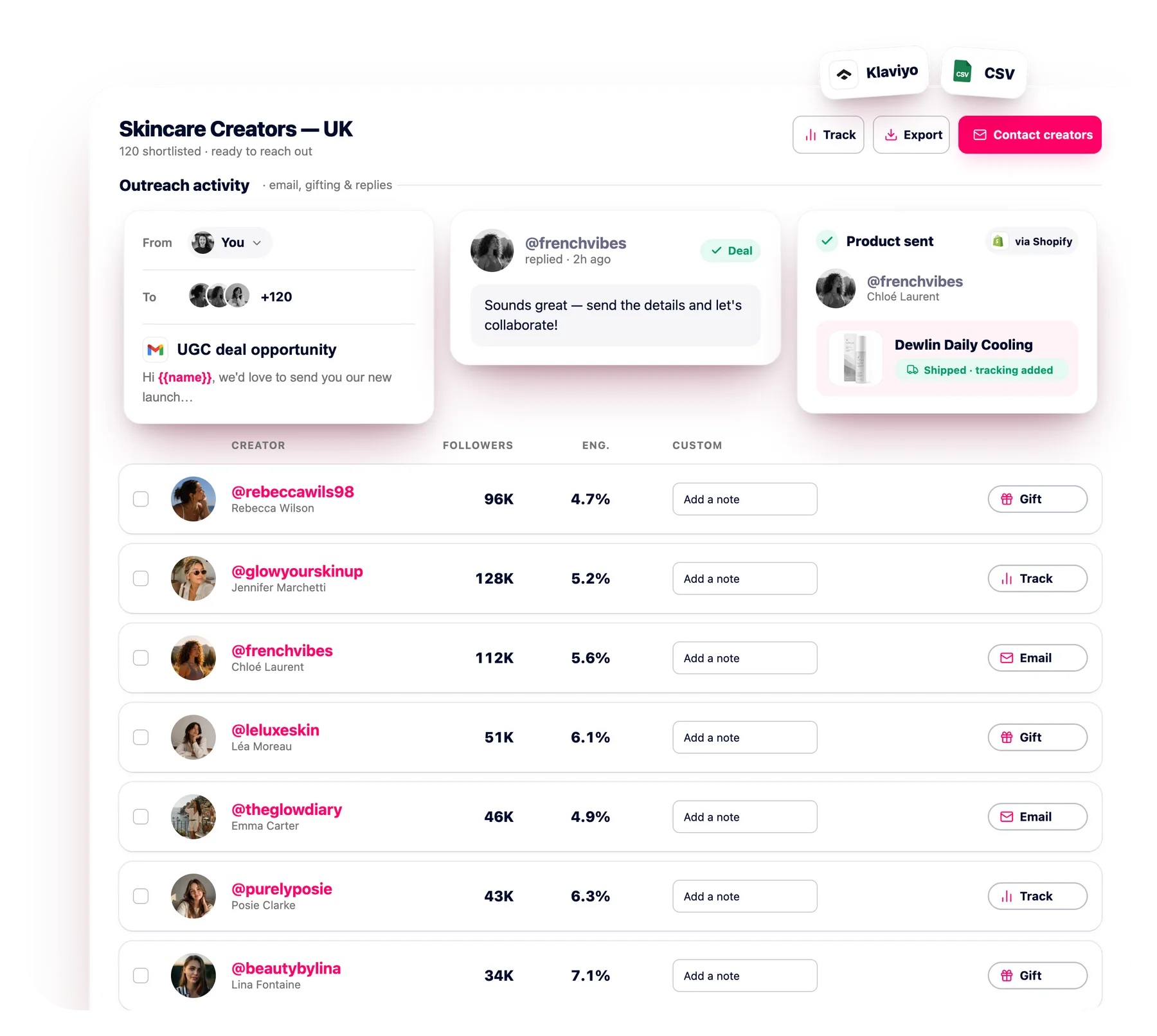
Save qualified creators into campaign-specific lists for outreach and review.
Export Options
Export creator details and available emails for outreach workflows.
CRM Workflow Support
Move creators into relationship management using connected creator workflow tools.
Multi-Platform Expansion
Extend outreach beyond YouTube with TikTok and multi-platform discovery tools.
Snippet-ready answer
A YouTube email finder helps brands, agencies, and influencer teams identify available public business emails for YouTube creators. ClickAnalytic combines email discovery with creator review, shortlists, exports, and CRM workflow support.
Use ClickAnalytic when you need to find YouTube channel email contacts, build outreach lists, and keep creator contact data connected to campaign planning.
When to use this workflow
Use ClickAnalytic when your team needs to find YouTube channel email contacts for creator outreach, build campaign lists by niche or country, reduce manual channel hunting, keep contact data connected to shortlists, and prepare clean outreach exports.
What a YouTube email finder actually pulls
A YouTube email finder is for contact lookup after you already have channels to contact. ClickAnalytic helps you pull public business-inquiry emails from the About page, so your team can move from channel research to outreach prep without manual copying.
- YouTube About-page email: Extract the public email a creator makes available for business requests.
- Channel inquiry context: Keep the channel URL, title, and source context with the contact.
- Channel description notes: Retrieve helpful public details when they support outreach.
- Export contact data: Copy or export contact fields for your campaign workflow.
“YouTube comments can be useful, but email gives teams more room to introduce campaigns, share deliverables, discuss rates, attach briefs, and track replies.”
Influencer Strategy Team
Extract business-inquiry emails from YouTube About pages
Many YouTube creators publish a business email inside the channel About page for partnership requests. ClickAnalytic is built to extract that public YouTube business email and keep it tied to the right channel, instead of leaving your team to open tabs and copy addresses by hand.
- Public-only lookup: Look up emails that creators choose to show for business inquiries.
- Source clarity: Keep the About page as the contact source.
- Campaign handoff: Pull each channel inquiry into an organized contact record.
- Cleaner lists: Compile contact fields with channel URLs and names for outreach.
Workflow scenario: A skincare team needs YouTube creator contact details for a product launch. The team defines the market, reviews relevant channels, checks available public emails, saves qualified creators, and exports an outreach list.
Set product category, audience, market, budget, and creator requirements
Identify YouTube creators with relevant public business email data
Save qualified channels by market, product, client, or campaign
Export creator details or manage contacts inside your workflow
Skip clicking into every channel description
Manual YouTube contact work often means opening each channel, reading the channel description, checking the About page, copying an email, and updating a spreadsheet. That process breaks down when your campaign has dozens or hundreds of potential partners.
- Less tab work: Retrieve public contact details without repeating the same steps all day.
- Fewer copy errors: Copy contact fields from structured results instead of scattered notes.
- Faster outreach prep: Pull YouTube About-page email data into a list your team can use.
- Consistent records: Keep the channel name, URL, and email source together.
| List Element | Platform | Creator A | Creator B | Market | Format | Use It To Prioritize |
|---|---|---|---|---|---|---|
| Available business email Creator contact | YouTube | Found | Review | US | Long-form video | Outreach-ready contacts |
| YouTube channel | YouTube | Verified | Verified | Canada | Shorts | Correct channel records |
| Niche and content category | YouTube | Beauty | Skincare | North America | Product review | Campaign relevance |
| Audience and channel signals | YouTube | Strong | Needs review | United States | Live stream | Quality checks |
| Shortlist status | YouTube | Approved | Later | Local | Mixed | Next outreach step |
Scale without losing quality
When teams build creator contact lists at scale, quality can drop fast. Generic lists may include irrelevant channels, inactive accounts, or creators who do not match the campaign audience.
ClickAnalytic helps you keep quality checks inside the process. For broader creator sourcing, use the influencer database. For deeper audience data, visit audience analytics. For broader campaign sourcing, use the influencer discovery platform.
Build a YouTube outreach list ready for your campaign tool
A usable YouTube outreach list needs more than an email column. ClickAnalytic helps you compile contact records with the channel, public email, source page, and outreach context your team needs before sending pitches.
- List-ready fields: Compile contact details with channel names, URLs, and business-inquiry emails.
- Campaign grouping: Save contacts by campaign, market, product, or brief.
- Export contact data: Export contact records for email tools, CRM systems, or shared team files.
- Cross-platform next steps: Use the Instagram Email Finder or TikTok Email Finder when your list also covers other platforms.
How ClickAnalytic extracts YouTube business emails
ClickAnalytic is designed for teams that already know which YouTube channels they want to contact. Add your channel set, then use the platform to look up public About page contact details and retrieve the email fields creators provide for business inquiries.
Start from YouTube channel URLs, handles, or saved lists.
Extract YouTube business email data from the About page when available.
Pull source details, channel names, and URLs into the same record.
Copy records or export contact data for your campaign tool.
YouTube Email Finder vs. Influencer Search Tool
| Row | YouTube Email Finder | Influencer Search Tool |
|---|---|---|
| Stage | After channel selection, during contact lookup. | Before contact lookup, during creator list building. |
| Output | YouTube business email records from About pages. | A creator list aligned to campaign criteria. |
| Inputs | Known YouTube channels, handles, or URLs. | Campaign topics, markets, platforms, and audience goals. |
| When to use | Use it to extract, copy, and export contact details. | Use it when you need an initial set of creators to review. |
Identify
Start with creators that match your niche, location, audience, and campaign criteria.
Review
Check content style, category, audience relevance, and brand alignment before outreach.
Collect
Identify available public business emails connected to YouTube creator channels.
Outreach
Save qualified creators, export contact details, and send personalized campaign emails.
Use the right workflow: ClickAnalytic supports the full path from YouTube creator discovery to public email collection, channel review, campaign shortlists, exports, and relationship tracking.
Use Creator CRM for relationship tracking, Influencer Database for broader creator sourcing, Influencer Discovery Platform for campaign research, and Influencer Vetting Tool for evaluation before outreach.
FAQ
Can ClickAnalytic extract every YouTube creator email?
No. ClickAnalytic can retrieve a YouTube About-page email only when the creator makes it publicly available for business inquiries.
Is this the right tool to look up contacts after creator selection?
Yes. This page is for contact lookup after you already have YouTube channels. For earlier creator sourcing, use the Influencer Search Tool.
Can I export contact data for outreach?
Yes. You can compile contact records, copy key fields, and export contact lists for your outreach workflow.
Answers to common questions about YouTube email discovery, creator contact data, outreach lists, exports, and workflow support.
What is a YouTube email finder?
ClickAnalytic combines YouTube email discovery with creator review, vetting, shortlists, exports, and CRM workflow support.
How do you find a creator's email on YouTube?
ClickAnalytic helps speed up this process by surfacing available public creator email data and keeping it connected to your outreach workflow.
Is this allowed and legal?
Use clear messaging, contact relevant creators, and give recipients a simple way to opt out of future communication.
Does ClickAnalytic find all emails?
ClickAnalytic helps you find available public emails when they can be identified, while also giving you creator discovery and workflow tools for the channels you want to contact.
How is this different from basic email extraction tools?
Instead of just pulling emails into a spreadsheet, ClickAnalytic helps you review creator fit, save shortlists, export outreach lists, and connect contact data to your creator workflow.
Can I export emails?
You can build campaign-specific lists, review the creators you want to contact, and export the relevant data when you are ready.
Can I use this with a creator CRM?
Does ClickAnalytic support TikTok and YouTube emails too?
Extract YouTube creator emails in bulk
Turn known YouTube channels into outreach-ready contact records. ClickAnalytic helps your team pull public business-inquiry emails from About pages, compile contact details, and export contact data without rebuilding spreadsheets by hand.
- Use it for YouTube: Extract public YouTube business email data from channel About pages.
- Use it at scale: Retrieve contacts across larger channel lists.
- Use it with your workflow: Copy or export contact records when your campaign is ready.
If your team still finds YouTube emails by opening channels one at a time, ClickAnalytic can help you save hours and build better outreach lists. Find YouTube creator emails, qualify channels, save shortlists, and move contacts into your creator workflow.
Discover YouTube creators, identify available public business emails, review fit, and build cleaner outreach lists.
Capterra 4.8
G2 4.8
No credit card · 4.8 on Capterra and G2
Trusted by marketing teams, agencies, and growing brands
Secure, structured YouTube email discovery for modern creator marketing teams.
For platform-specific outreach, also explore the TikTok email finder and YouTube email finder. For a broader workflow, visit the creator CRM, influencer database, and influencer discovery platform.