
👉 1920 × 1080 pixels (16:9 aspect ratio) for standard videos
👉 1080 × 1920 pixels (9:16) for YouTube Shorts
👉 Thumbnails are 1280 × 720
👉Channel banners are 2560 × 1440 pixels with a 1546 × 423 safe area
⚠️ Using the wrong YouTube video dimensions can cause black bars, blurry playback, cropping, or aggressive compression!
Especially when viewed on 4K screens, smart TVs, or large desktop displays.

With more than 2.5 billion monthly active users worldwide, YouTube remains the largest video platform on the internet, and viewers collectively watch over a billion hours of video every day.
At this scale, even small formatting mistakes can impact viewer retention, watch time, and overall performance.
This complete YouTube video size guide gives clear answers without technical noise.
You’ll learn:
✔️ The exact YouTube video size dimensions
✔️ Simple steps to fix soft or pixelated upload
✔️ Clear thumbnail and banner dimensions
✔️ Supported resolutions for 720p to 8K
✔️ Critical file size limits and compression settings
And much more! Ready? Let’s uncover 👇
YouTube Size Cheat Sheet
Creators waste hours guessing numbers that YouTube already expects…
Before we dive into the details of the YouTube size guide, a quick chart can save you a lot of guesswork.
It shows the numbers before you press Record or open the editor. Instead of searching five different pages, you can look at one table and pick the size you need 👇
| Element | Recommended Size | Ratio |
| YouTube video | 1920 x 1080 | 16:9 |
| YouTube Shorts | 1080 x 1920 | 9:16 |
| YouTube thumbnail | 1280 x 720 | 16:9 |
| YouTube banner | 2560 x 1440 | 16:9 with safe center |
| Profile picture | 800 x 800 | 1:1 |
These numbers work for most channels and keep images clear on phones, tablets, and large screens.
Use this sheet as a quick start every time you prepare content. Correct sizes reduce blurry results and make your channel look steady and organized without extra work.
You can also follow this super precise recap ⬇️
Resolution vs Aspect Ratio: Understanding Video Sizes for YouTube
Two lines catch the eye, resolution and YouTube aspect ratio, and most of us just guess. They look similar, but they do different jobs.
YouTube resolution size is just how much detail you have in your hands. More pixels give the eye more to look at, fewer pixels leave gaps, and the gaps show up as softness. A 1920 by 1080 file usually feels cleaner than a 1280 by 720 file, even if nothing else changes, and you notice it most on faces and small text.
YouTube ratio is not about quality at all. It is about the body of the video, the way it stands on the screen. Wide frames sit comfortably on a laptop or TV, tall frames fit the phone in your palm, and the same clip can feel completely different in each shape.
YouTube tries to squeeze every upload into its player. When the resolution for YouTube is thin, the site has no extra detail to borrow, so the picture looks washed out. When the YouTube video size ratio does not match, YouTube pushes the sides in or adds space around the video, and that is when the frame starts to look awkward.
Many creators learn this the hard way. They film something beautiful and then watch it shrink into a strange shape online. Others shoot everything vertical for Shorts and later try to reuse the same file for a long video, only to see it look out of place.
- Pick the ratio before you start editing
- Keep as many pixels as you can while you work
- Avoid changing the shape at the last step
- Look at the result on a phone and on a laptop
Small choices during editing leave big marks on the final upload. When the numbers match what YouTube expects, the video simply looks right. The detail stays clean, the shape feels natural, and viewers pay attention to the story instead of the frame.
YouTube Aspect Ratios Explained
YouTube video aspect ratios are just shapes. That is all they are. The shape changes how a video feels before anyone even presses play, and viewers notice it faster than they notice the camera or the edit.
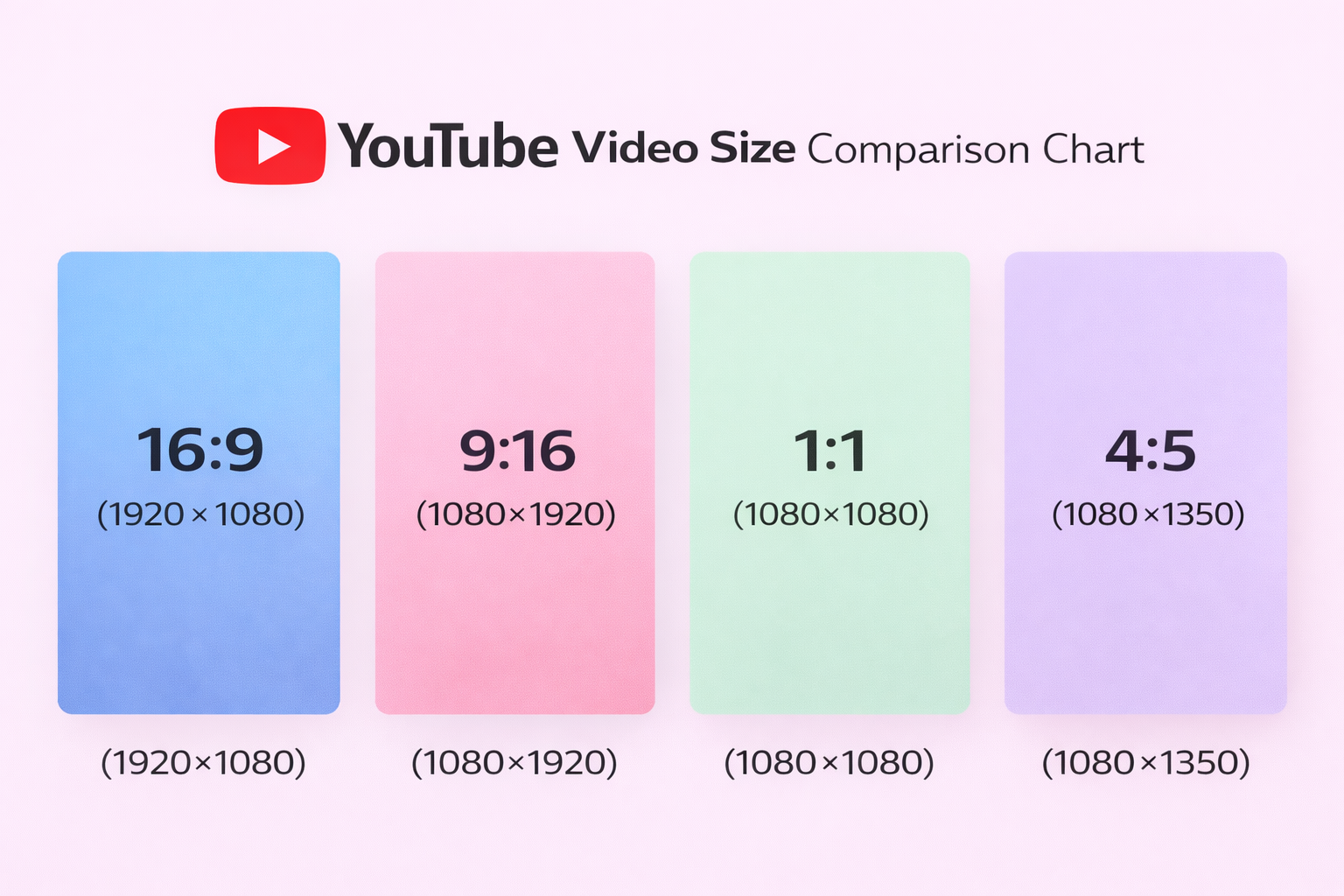
16:9 – YouTube Video Size
This is the wide view people grew up with. It fits the screen on a laptop, a TV in the living room, and most tablets. Use it when the video has more than one person or when you need space for examples on the side. Long conversations and tutorials breathe better here. The frame gives you room to move without cutting your shoulders or hands.
9:16 – YouTube Video Size
Vertical videos feel like a phone conversation. The frame stands up close to the face, and everything looks more personal. Shorts live in this world. Quick updates, street clips, and behind-the-scenes moments look right because people already hold their phones this way.
If you also publish vertical content on multiple platforms, see our complete TikTok aspect ratio guide to keep formatting consistent across channels.
1:1 – YouTube Video Size
The square YouTube video format is a quiet middle ground. It travels well between platforms and does not fight with any screen. I reach for it when the video is simple and centered, like a product on a table or one person speaking straight to the lens.
4:5 – YouTube Video Size
This one is taller than square but not fully vertical. It works for portraits and lifestyle shots where you want to show a bit more body and background. Fashion creators like it, and so do people who film cooking or crafts.
The ratio starts the conversation with the viewer before the first word. Wide frames suit stories with detail. Tall frames suit quick and close moments. Square and 4:5 help when the same video needs to live in several places. Think about the hand that holds the screen and the place where the video will appear, and the choice becomes clearer.
YouTube Video Dimensions
YouTube dimensions video decides how a clip feels before anyone listens to a single word. The size of the frame changes the mood, the clarity, and even the way people pay attention. Many creators spend money on microphones and forget that YouTube post dimensions can matter just as much.
Standard YouTube Video Size
Most long videos use 1920 by 1080 pixels in a 16:9 YouTube video size. This size for YouTube video fits the screens people use every day. It looks natural on laptops, televisions, and tablets, and the player on YouTube expects this format by default.
Some channels still post 1280 by 720. It can work for simple talking videos, but the picture often feels thin on larger screens. Details in faces or small text start to soften. Viewers notice that even if they cannot explain why.
Best Resolutions for YouTube
Full HD at 1920 by 1080 is the best YouTube video resolution. It keeps a good balance between quality and YouTube video sizes. Uploads finish faster, and most viewers see a clean image without extra waiting.
4K at 3840 by 2160 brings more detail. It’s especially required for travel scenes, product close-ups, or videos with a lot of texture. The files are heavier, and the process takes longer. Nevertheless, the result holds up on big televisions. Some creators record in 4K and later export in Full HD to keep room for cropping.
720p still exists for quick posts or screen recordings, but modern displays show its YouTube video size limits. If the video includes subtitles or fine details, this YT size can look tired. The right YouTube video resolution depends on what you film and how patient you are with large files.
Here’s a quick table summary of the best resolutions for YouTube:
| Resolution | Size | Best For |
|---|---|---|
| 720p | 1280×720 | Screen recordings |
| 1080p | 1920×1080 | Standard YouTube |
| 1440p | 2560×1440 | High detail |
| 4K | 3840×2160 | Travel / Product |
| 8K | 7680×4320 | Cinematic projects |
Why YouTube Video Size Affects Ranking & Retention
Uploading in the recommended resolution of 1920 × 1080 pixels (1080p) matters because videos at that quality receive significantly more views.
According to benchmark research, 1080p videos get 65% more views than those at lower resolution, underscoring the impact of high-quality formatting on audience reach and engagement.
🚨Important to note when discussing YouTube video size tips 🚨
-> YouTube prioritizes viewer retention and watch time.
Blurry or incorrectly sized videos reduce perceived quality, increasing early drop-off. Higher resolution uploads also unlock higher bitrate streaming, improving clarity on large screens.
As brand sponsorships continue to rise 54% year over year, maintaining high technical standards strengthens credibility with both viewers and potential partners.
Alternative YT Video Ratio
Shorts and phone clips live in 9:16, and that tall shape fills the YouTube screen dimensions without turning the device. It suits quick tips, daily moments, and content made for scrolling.
Square 1:1 videos move easily between platforms. They sit neatly in feeds and do not ask viewers to rotate anything. Many creators choose this when they plan to share the same file in several places.
The 4:5 is one of the best video formats for YouTube, which stands between square and vertical. It gives more height for portraits and lifestyle scenes while still looking balanced on a desktop. Cooking clips, fashion looks, and close demonstrations often feel right here.
YouTube dimensions for video also influence how you film. A wide frame allows two people to sit comfortably in one shot. A vertical frame asks you to stay closer and simpler. Changing the shape after filming rarely looks good, so it helps to decide early.
Video dimensions for YouTube shape the whole experience long before editing begins. Standard sizes keep most channels safe, higher YouTube resolutions add depth, and different YT aspect ratios open space for new styles. When you pick the size before you press record, the rest of the work becomes easier, and the final video feels at home on the screen where people meet it.
Video Size for YouTube Shorts
Shorts pushed YouTube toward the way people already use their phones. Most viewers open the app for a moment, move a finger, and make a decision before a word even lands. YouTube’s short format of the video affects that moment more than people expect. A clip that fits the screen feels right, and a clip with the wrong YouTube Shorts dimensions feels awkward from the first frame.

Shorts Safe Text Zone
⚠️Avoid placing subtitles or key elements at the extreme top or bottom.
YouTube overlays buttons and captions in these areas. Keep important text within the center 80% of the frame.
Correct Size for Shorts
YouTube Shorts aspect ratio is 1080 by 1920 in a 9:16 frame. That tall YouTube shorts size fills the phone the way people actually hold it. When the video fits that form, nothing distracts the eye, and the clip feels made for the screen.
A wide video can become a Short, but it often looks shrunken with dark bars around it. Square clips behave the same way. The platform leans toward vertical, and the closer the file stays to that, the easier the viewing feels.
Filming upright keeps everything simple. The phone already captures the right shape, so there is little need to cut the image later. With other cameras, turning them on their side or planning space around the subject gives room to adjust in the edit.
Resolution for YouTube Shorts and Length
YouTube shorts resolution matters for long and short videos equally. The platform prefers clear files, and YouTube’s short aspect ratio of 1080 by 1920. This gives enough detail for faces, text, and quick movements. By the way, lower resolutions can work, but they start to look soft when viewers watch on newer phones.
Length also affects how the YouTube horizontal video size behaves. Shorts can run up to sixty seconds, yet many strong clips stay between ten and twenty seconds. A shorter video often looks sharper because there is less time for compression to show its teeth. Long Shorts with busy scenes sometimes lose clarity after upload.
Creators who add subtitles should leave space in the middle of the frame. Text near the very top or bottom can disappear behind buttons on the screen. A bit of breathing room keeps the message safe.
Common YT Shorts Size Mistakes:
- One common mistake is mixing YouTube formats inside one clip and forgetting about YouTube short video dimensions. A creator starts with a vertical shot, adds a horizontal screenshot, and the video jumps between shapes. The viewer feels the bump right away. Keeping one YT shorts aspect ratio from start to finish makes the Short smoother.
- Another issue appears when people reuse old wide videos. They crop the center to make it vertical, and important details vanish. Hands, faces, or products fall outside the new frame. Planning for vertical filming saves that trouble.
- Many beginners also export at low bitrates to speed up the process. The file uploads fast, but the picture turns muddy after YouTube processes it. A slightly larger file usually looks much better.
- Music and text overlays can create problems, too. Loud tracks push YouTube to compress the audio heavily, and the image suffers along with it. Simple sound and clean visuals survive the upload with more dignity.
Shorts live in a fast-moving feed, and YouTube short dimensions decide whether a viewer stops scrolling. The right size keeps attention on the idea instead of the frame. When the video fills the phone and stays clear, the story gets a fair chance.
What Is the YouTube Thumbnail Size
Thumbnails are small, and viewers move past them quickly. The picture has a second to make sense before the next video takes its place. When the YT thumbnail size is wrong, the message disappears even if the video itself is strong.

Exact Thumbnail Dimensions
The best YouTube thumbnail size is1280 by 720 pixels in a 16:9 aspect ratio. The platform shows this size on different screens without changing the picture. Images built at these YouTube thumbnail dimensions keep their form across different screens. The design of thumbnail size for YouTube has enough space to show a face or a short phrase without looking tight.
The platform accepts JPG and PNG files and asks for YouTube recommended thumbnail size under two megabytes. Simple designs fit inside those limits without effort. Clean backgrounds keep attention on the subject, and confident colors remain visible after YouTube processes the file. A well-balanced YouTube image dimension speaks quickly when viewers scroll through the feed.
Safe Zones for Text
Text needs a thoughtful place inside the thumbnail. YouTube adds small elements around the picture, such as the video length and channel badge. Leaving space near the edges protects important words from those overlays.
The main message works best near the center of the frame. Large letters stay readable on small screens, and short phrases feel clear at a glance. Phones reduce thumbnails to a compact size, so bold shapes and open spacing help the message travel across devices.
Thumbnails and titles play different roles. The title explains the idea in full, and the thumbnail gives a visual hint. When the thumbnail size for YouTube stays focused on one clear thought, viewers understand the video before they click.
YouTube Banner & Profile Sizes
A channel page gives viewers their first sense of who you are before they open any video. The banner and the profile picture sit at the top of that page like a small welcome sign.
YouTube banner sizes shape how tidy and confident the channel looks on different devices.
Strong visual branding also makes your channel more attractive in collaborations. Here are five ways to find YouTube influencers if you’re planning partnerships.

Channel Banner Size
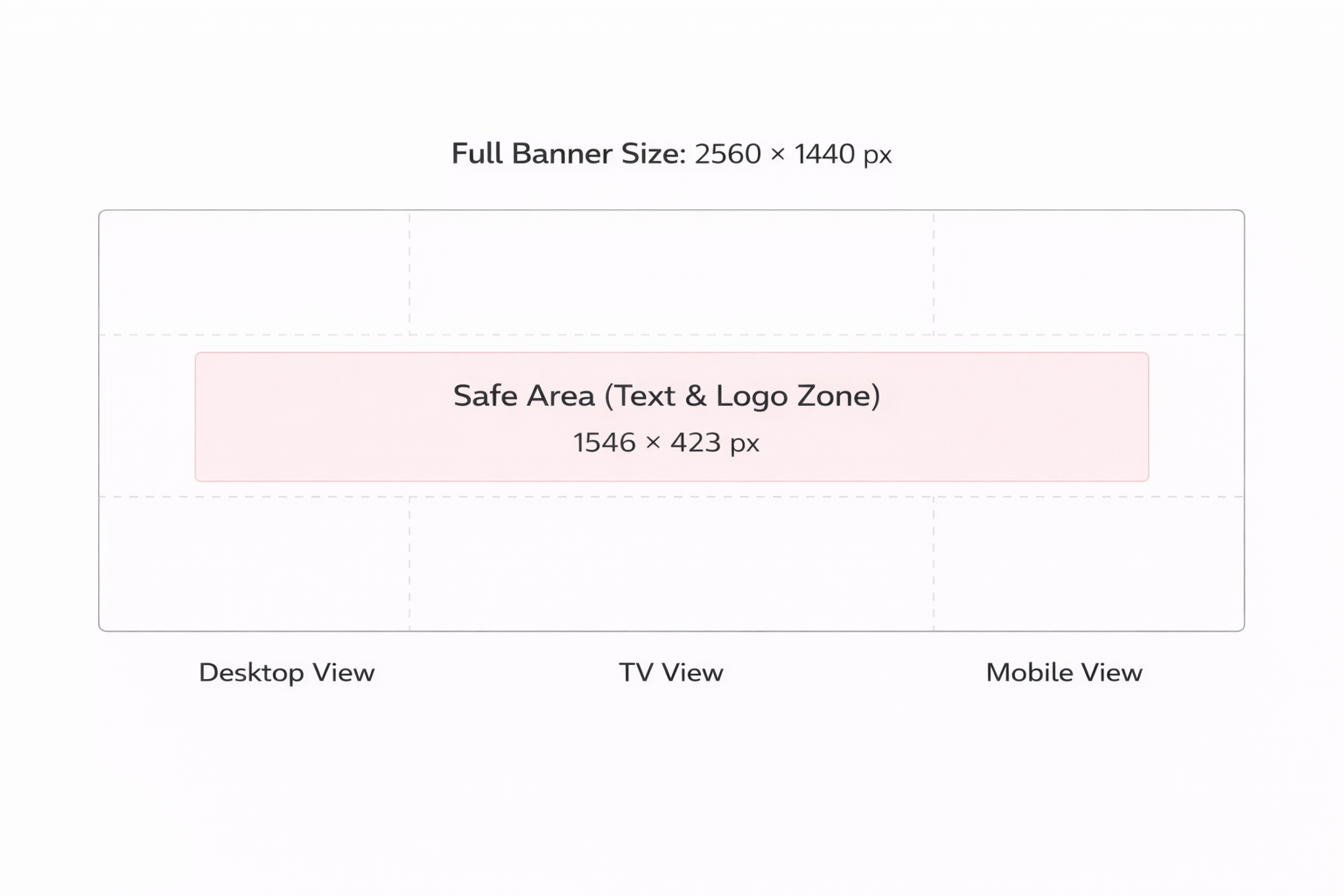
YouTube banner aspect ratio is 2560 by 1440 pixels as the base size. The image needs to be large to look clear on big televisions. On phones and laptops, only the center of the banner shows, and the sides fall away. Logos and text belong in that middle strip where every screen can see them.
Many creators design a banner on a computer and forget to check it on a phone. Words that look perfect on a big monitor can vanish when the screen shrinks. Keeping the main message short and close to the center avoids that problem. A simple layout with one idea works better than a collage of many elements.
File format for YouTube videos also matters. YouTube accepts JPG, PNG, and GIF images under six megabytes. Clean photos and clear graphics stay readable after the upload. Busy patterns and tiny letters often turn into noise. A banner has a long job to do, so calm designs age better than trendy effects.
💡The safe area that stays visible on all devices is 1546 × 423 pixels. Keep logos, text, and key visuals inside this zone to prevent cropping.
Profile Picture Size
The channel icon follows the video everywhere. It is beside comments and video titles, so viewers meet it before they notice the channel name. YouTube picture size is 800-by-800 and it is a circle for display. The main idea needs to live in the center, because the edges disappear after that round cut.
Faces and simple logos work better than detailed graphics. People recognize a shape faster than they read small letters. Thin lines and delicate icons lose strength in the small circle, especially on a phone screen. Clear forms with open space stay visible at any YouTube banner size.
Colors help people remember a channel. When the banner, the profile picture, and the thumbnails share a similar tone, the page feels familiar without extra effort. The aim is not decoration but recognition.
The banner and the YouTube video picture size need to fit together. A light banner and a very dark icon can look like two different channels. Close colors and a similar style make the page feel like one place instead of scattered pieces.
Testing on different screens saves many headaches. For this, you need to check the channel on a phone, a laptop, and a television, if possible. Each device shows a different slice of the banner, and small adjustments can improve the view on all of them.
A channel page grows with time. New topics appear, and the banner may need small updates. Keeping the original files and the right YouTube video dimensions makes those changes easy instead of starting from zero.
Formats & Technical Limits
Uploading to YouTube works best when the file follows a few clear boundaries. The platform reads many formats, yet some choices behave more smoothly than others. Picking a stable YouTube video format size at the start saves time later. It’s especially necessary when the video contains detailed images or layered sound. Besides, most creators only need a small set of rules to keep quality steady from the editor to the screen.
💡Pro Tip: YouTube officially recommends MP4 (H.264 video codec and AAC audio).
Best Format for YouTube
| Element | Preferred Option | Notes |
| Video container | MP4 | Fits YouTube processing with fewer delays |
| Video codec | H.264 | Keeps detail while holding file size in check |
| Audio codec | AAC | Works reliably on phones and TVs |
| Frame rate | Same as recording | Avoids uneven motion |
| Audio rate | 44.1 or 48 kHz | Clean playback across devices |
| Caption files | SRT or VTT | Simple timing and text |
| Image formats | JPG or PNG | Stable for thumbnails and banners |
Technical limits on YouTube are more like guard lines than strict walls. When a YouTube-sized video stays close to the options in the table, the platform treats the file kindly, and the picture keeps its character after upload. Small choices in the export window shape how viewers experience the work on different screens. A calm routine before publishing makes the process predictable and leaves more energy for the creative side of the channel.
Upload Optimization Checklist
Preparation saves more time than any setting inside YouTube:
1️⃣ Start with MP4 and H.264. YouTube understands that format without complaints.
2️⃣ Leave the frame rate alone. If you filmed at 30, export at 30.
3️⃣ Do not chase huge bitrates. More numbers do not always mean a better picture.
4️⃣ Match the YouTube video size to its purpose before you export.
5️⃣ Listen to the audio once on headphones. Voices show problems quickly.
6️⃣ Keep sound levels calm instead of loud and pushed.
7️⃣ Use SRT or VTT for captions and keep the lines simple.
8️⃣ Build the thumbnail at the right YouTube dimensions from the start.
9️⃣ Watch the file in full screen before uploading.
🔟 Open the video on a phone and on a laptop to see the differences.
🔟 + 1️⃣ Name the file with real words you will recognize later.
🔟 + 2️⃣ Upload when the internet feels stable, not when it struggles.
🔟 + 3️⃣ Wait a few minutes after upload for higher quality to appear.
💡Pro Tip: Publishing time also affects initial performance signals. Here’s a data-backed breakdown of the best time to post on YouTube to increase early engagement.
YouTube often shows a softer version right after upload. The platform still works in the background, building higher YouTube resolutions. Waiting a few minutes before sharing the link avoids awkward first impressions.
Metadata stands beside the technical steps. A clear title and description help the system place the video where it belongs. That information does not change the YouTube video size in pixels, yet it shapes how the file meets viewers.
Most problems blamed on YouTube begin in the export window. Clean footage compresses better than noisy scenes. Steady light and simple backgrounds give the codec an easier path.
Keeping original project files matters. Standards move, and a fresh export can revive an old video. Channels grow, and past uploads deserve the same care as new ones.
Common YouTube Size Mistakes
Even small mistakes in YouTube video size or formatting can reduce clarity, retention, and overall performance.
Here are the most common issues creators face:
❌ Uploading in 720p When Filmed in 4K
Downscaling too aggressively reduces sharpness. If you recorded in 4K, exporting at the standard YouTube video size of 1920 × 1080 or higher preserves detail and improves playback quality.
❌ Cropping Vertical Videos into Horizontal
Forcing a 9:16 clip into a 16:9 frame adds black bars or chopped content. Wrong aspect ratios lead to poor playback experiences, which can cause viewers to click away early. Early drop-offs correlate with lower audience retention, a key algorithmic signal.
❌ Ignoring the Banner Safe Area
Text or logos placed outside the 1546 × 423 safe zone can disappear on mobile screens. Designing for the full 2560 × 1440 banner without respecting the visible center causes layout problems.
❌ Exporting With the Wrong Frame Rate
Mismatched frame rates create unnatural motion and motion blur. Poor quality reduces a video’s polish, which viewers subconsciously judge as lower quality, and 91 % of viewers say technical quality matters for video to be seen as “high quality.”
❌ Over-Compressing to Reduce YouTube Video Upload Size
Shrinking file size too aggressively often leads to pixelation after YouTube re-encodes the file. Videos that fail to hold visual quality are more likely to get skipped early and average retention drops significantly when viewers lose interest.
❌ Uploading Incorrect Thumbnail Dimensions
Using wrong thumbnail sizes makes previews blurry and unreadable on small screens. Thumbnails are directly tied to click-through rate (CTR), one of YouTube’s core discovery metrics, so correct dimensions (1280 × 720) matter for both appearance and algorithmic reach.
Why These Technical Mistakes Matter
YouTube’s algorithm favors videos that keep people watching, measured by watch time and audience retention, as key predictors of relevance.
High retention means viewers stay longer, which correlates with stronger recommendation and search performance.
In 2025 benchmarks, the average global YouTube retention rate for most videos is in the 40 %–60 % range, and videos that exceed this see more recommendations and higher visibility.
💡Free tip: You can measure how technical improvements impact performance using our free YouTube engagement calculator.
FAQs
What is the best YouTube video file format?
The recommended YouTube video file format is MP4 using H.264 video codec and AAC audio. This YouTube format size processes efficiently and maintains high quality. Choosing the correct video format for YouTube helps prevent compression artifacts and ensures stable playback across devices.
What format are YouTube videos?
YouTube accepts multiple formats including MP4, MOV, AVI, WMV, and FLV. However, MP4 remains the preferred video format for YouTube due to processing reliability and efficient YouTube video upload size management. Other formats are re-encoded after upload, which can slightly affect clarity.
What is the YouTube video size?
The standard YouTube video size is 1920 × 1080 pixels (16:9) for horizontal videos. YouTube video size in pixels can also include 1280 × 720 (720p), 2560 × 1440 (1440p), and 3840 × 2160 (4K). Selecting the correct YouTube video size ensures proper scaling and avoids black bars.
What is the best format to upload to YouTube?
The best format to upload to YouTube is MP4 with H.264 and AAC audio. This configuration balances YouTube video upload size with quality retention. Matching the export resolution to the standard YouTube video size and preserving frame rate improves processing stability.
What is the recommended YouTube thumbnail size?
The recommended YouTube thumbnail size is 1280 × 720 pixels with a 16:9 ratio. Files should remain under 2 MB. Using the correct YouTube thumbnail size supports clarity across devices and aligns with the platform’s standard YouTube video size proportions.
How many pixels is a YouTube video thumbnail?
A thumbnail measures 1280 pixels wide and 720 pixels tall. Those numbers match the standard YouTube video size and keep details readable after YouTube scales the image. Staying near this YouTube video size prevents the fuzzy look that comes from heavy resizing.
What aspect ratio is YouTube?
Regular YouTube videos use the 16 by 9 ratio. This wide frame fits modern monitors and televisions without empty bars on the sides. Other YouTube aspect ratio pixels still work, but they can leave black space and pull attention away from the content.
What aspect ratio is YouTube Shorts?
The best aspect ratio for YouTube Shorts is 9:16, with dimensions of 1080 × 1920 pixels. This vertical YouTube video size fills the mobile screen naturally. Using the correct best aspect ratio for YouTube Shorts avoids letterboxing and maintains viewing consistency.
How to Resize a Video for YouTube (Step-by-Step)
Follow these steps to match the correct YouTube video size before uploading:
☑️ Check the YouTube Video Size, Width, and Height
Open your file properties and confirm the exact YouTube video size, width, and height. Standard horizontal videos should measure 1920 × 1080 pixels (16:9). Shorts should measure 1080 × 1920 pixels (9:16). Verifying this first prevents distortion later.
☑️ Choose the Correct Size of a YouTube Video
The standard size of a YouTube video for long-form content is 1920 × 1080 pixels. Lower resolutions such as 1280 × 720 may work but reduce clarity on large screens. Always match your export resolution to the intended format.
☑️ Follow YouTube Video Requirements
Export in MP4 format using H.264 video codec and AAC audio, which meets YouTube video requirement guidelines. Maintain the original frame rate (e.g., 30fps or 60fps) and avoid stretching the aspect ratio.
☑️ Set an Appropriate Bitrate
Use a balanced bitrate to maintain clarity without unnecessarily increasing YouTube video upload size. Over-compression can cause pixelation after YouTube processes the file.
☑️ Confirm Thumbnail Dimensions
Although video resolution is separate from thumbnail design, some creators mistakenly confuse them. The correct YouTube thumbnail size is 1280 × 720 pixels, not YouTube thumbnail size 1920×1080. Keeping thumbnail dimensions correct improves clarity in previews.
YouTube Sizes Without the Confusion
Creators meet size questions at the moment they open the editor, not when they start filming. The platform shows one video in many places, and each place treats the image a little differently. That is why people search for terms like YouTube thumbnail size or aspect ratio for YouTube, even after they already uploaded dozens of clips.
File limits appear during export. The YouTube file size limit and YouTube upload size limit decide how heavy the final file can be, and those limits shape the choices inside the editor. MP4 stays the most stable best format for YouTube videos, while other YouTube video formats sometimes need extra time to process. Channel graphics follow separate rules, including the YouTube watermark size, YouTube post image size, and the broader YouTube canvas size for banners.
Many issues start from mixing shapes rather than from bad quality. The aspect ratio of a YouTube video works best when it stays true to the original recording. The aspect ratio of the YouTube thumbnail needs empty space in the center so overlays do not cover the message. A quick look at the YT video size and the YouTube video dimension before publishing keeps the image calm across devices. When the video size for YouTube fits the platform, the result feels natural instead of forced.