Influencer Campaign Management: One Cockpit for Every Brief, Draft, and Deadline
Run a live influencer marketing campaign with 10 or 50 creators from a single screen. Status pills, draft approvals, posting calendar, and budget tracker in one place. No more pasting links between Asana, Slack, Gmail, and a spreadsheet.
A 10-creator campaign turns into a tab graveyard by Friday
A campaign with 5 creators fits on a Google Sheet. A campaign with 20 does not. By creator 10, the team is pasting links between five tools every morning and asking each other on standup what the status is, because nobody can see it in one place. Three failure modes show up every time:
Briefs scattered across Gmail and Notion
Half the brief lives in a Notion doc, the other half in an email chain, and the agreed change is buried in a Slack thread. The creator gets confused, the brand brief drifts.
Drafts stuck waiting on the right reviewer
A draft sits in a shared folder for 5 days because nobody knows it is their turn to review. The creator sends a polite ping. Then a less polite ping. Then the post date slips.
Post dates that slipped because nobody saw the calendar
Three creators are scheduled to post the same day. Two miss the date. The campaign launch loses its drumbeat and the PR team finds out from Slack instead of the brief.
Six panels per campaign, one screen
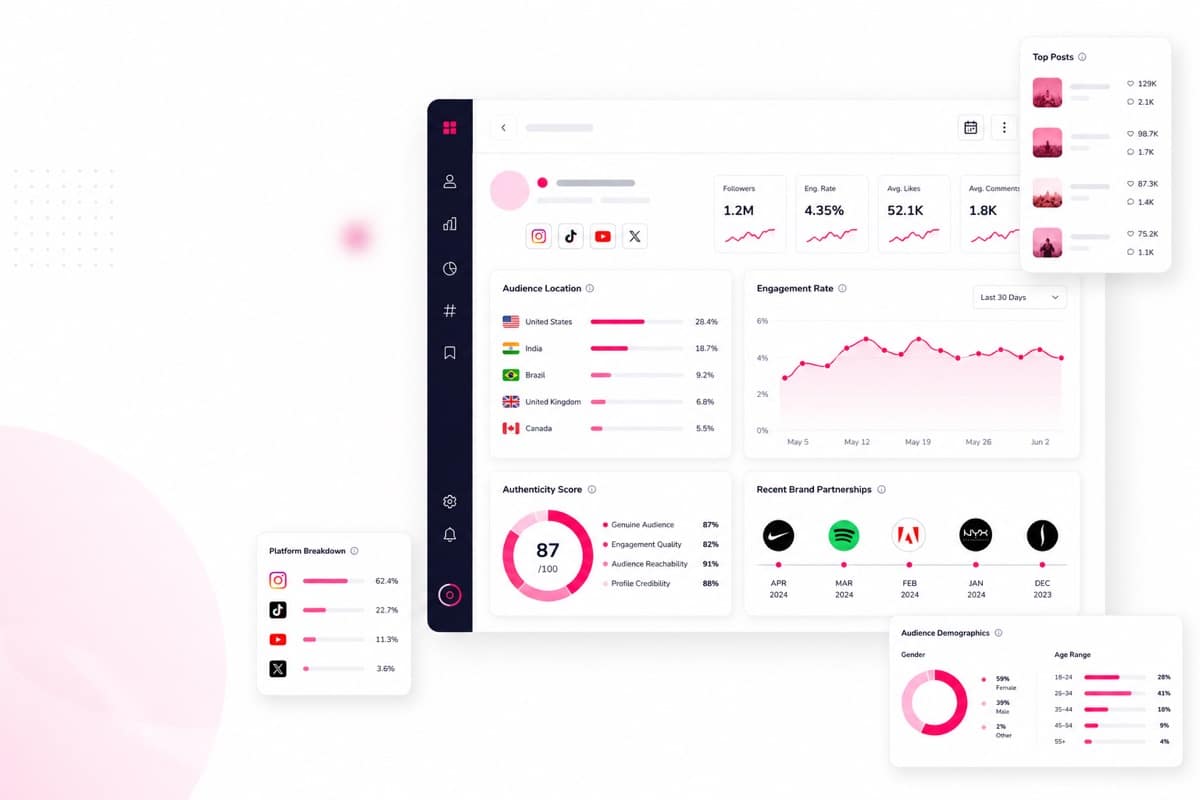
Every active campaign opens in the same cockpit view. Status, briefs, drafts, calendar, budget, team comments — all visible without switching tabs.
Creator grid with status pills
Every creator on the campaign in one row. Brief sent, draft in, approved, scheduled, posted, paid. Color-coded so a 30-second glance tells you where the campaign is.
Brief sending and templates
Brief template with your campaign details, sent to the creator, recorded with date and sender. No more "did you send the brief?" Slack pings.
Draft approval inbox
Creators submit drafts, the team comments and approves or requests changes. Version history kept. The draft is no longer in three folders.
Posting calendar
Every scheduled post across every creator on one calendar. See clashes before they happen. Drag to reschedule without losing the audit trail.
Budget tracker
Campaign total, committed per creator, paid per creator, remaining. Manual entry for invoices keeps it honest. Finance gets a clean export.
Team comments per creator
Threaded comments per creator and per draft. No more DM ping-pong. New team member can read the entire history in 5 minutes.
Add creators, send briefs, review drafts, ship the influencer campaign
Four steps per campaign. Repeat for the next creator, then the next, and the campaign moves forward on a single timeline your whole team can see.
Add creators from your CRM
Pull from your existing creator roster in one click. No double entry. The creator brings their full record with them.
Send briefs from templates
Use a campaign brief template, edit per creator, send. The brief is recorded with date, sender, and what was sent.
Review drafts and approve
Drafts come into the approval inbox. Team comments, requests changes, or approves. Version history retained.
Lock posts and watch budget
Schedule the post date, mark posted when live. The budget tracker updates as you log committed and paid amounts.
Asana + Sheets + Slack + Gmail + Notion vs one cockpit
Everything you need, in one ClickAnalytic plan
Campaign management is one cockpit inside a connected platform. Discovery, analysis, vetting, CRM, tracking, and reporting are all in the same plan.
Vet any creator before you pay them.
Structured pre-approval checklist across many creators.
Surface inflated audiences before contracting.
Your full creator roster with tags, notes, and rates.
Long-term portfolio view across every campaign you have run.
Close out the campaign with results, ROI, and exports your CMO actually wants.
Track post performance and deliverables as content goes live.
Get public contact details for creators ready for outreach.
Built for live campaigns with 10+ creators
If your next campaign has more than 10 creators, you outgrew spreadsheets. Three teams that hit that threshold first.
Brand marketer running a launch
20 to 50 creators across one campaign window, multiple stakeholders, hard launch date. Needs one screen the team can read in 30 seconds.
Agency producer running 5 client campaigns
Different briefs, different brands, same operational chaos multiplied. Needs separate cockpits per client without losing context.
Freelance influencer-marketer running one big campaign
Solo operator, no margin for status meetings, every saved hour is invoiced. Needs the campaign cockpit to be the operating system.
5 client campaigns, status meetings 4h → 25 min
"We were running 5 client campaigns at once across 60 creators. Weekly status meetings hit 4 hours because every account manager had to read out from a different tool stack. ClickAnalytic gave us one cockpit per campaign. Status meetings are 25 minutes now and the account managers spend the saved time on actual creator work."
Senior Producer at a creator agency · 32 active campaigns per quarterOpen Campaign Cockpit Free →
Campaign vs Relationships vs Reporting vs Tracking
Same database. Different verbs. Pick the page that matches what you are doing right now.
What this cockpit does no do
Honest limits beat overpromising. Five things outside scope.
Free cockpit, paid scales when you do
Start with a free workspace for one active campaign and 5 creators. Paid plans start at $59/mo for unlimited campaigns, creators, and team seats.
- ✓ 1 active campaign
- ✓ Up to 5 creators
- ✓ Brief, draft, approval flow
- ✓ Unlimited campaigns + creators
- ✓ Posting calendar + budget tracker
- ✓ CSV + PDF exports
- ✓ Team seats included
What teams ask before opening the cockpit
How is this different from Asana or Notion?
How is it different from Relationship Management?
Does it auto-write briefs or auto-approve drafts?
Can my whole team see the same campaign?
Do you process creator payments?
Can I export the campaign at the end?
What happens when the campaign ends?
Stop running campaigns from a tab graveyard
Open the cockpit, send the briefs, approve the drafts, ship the launch. Free for one active campaign and five creators. No card.Open Campaign Cockpit Free →
CANCEL ANYTIME · FREE TIER NEVER EXPIRES · NO CREDIT CARD
Comentarios recientes