
Vind influencers voor uw merk: krijg binnen enkele minuten een gerangschikte shortlist
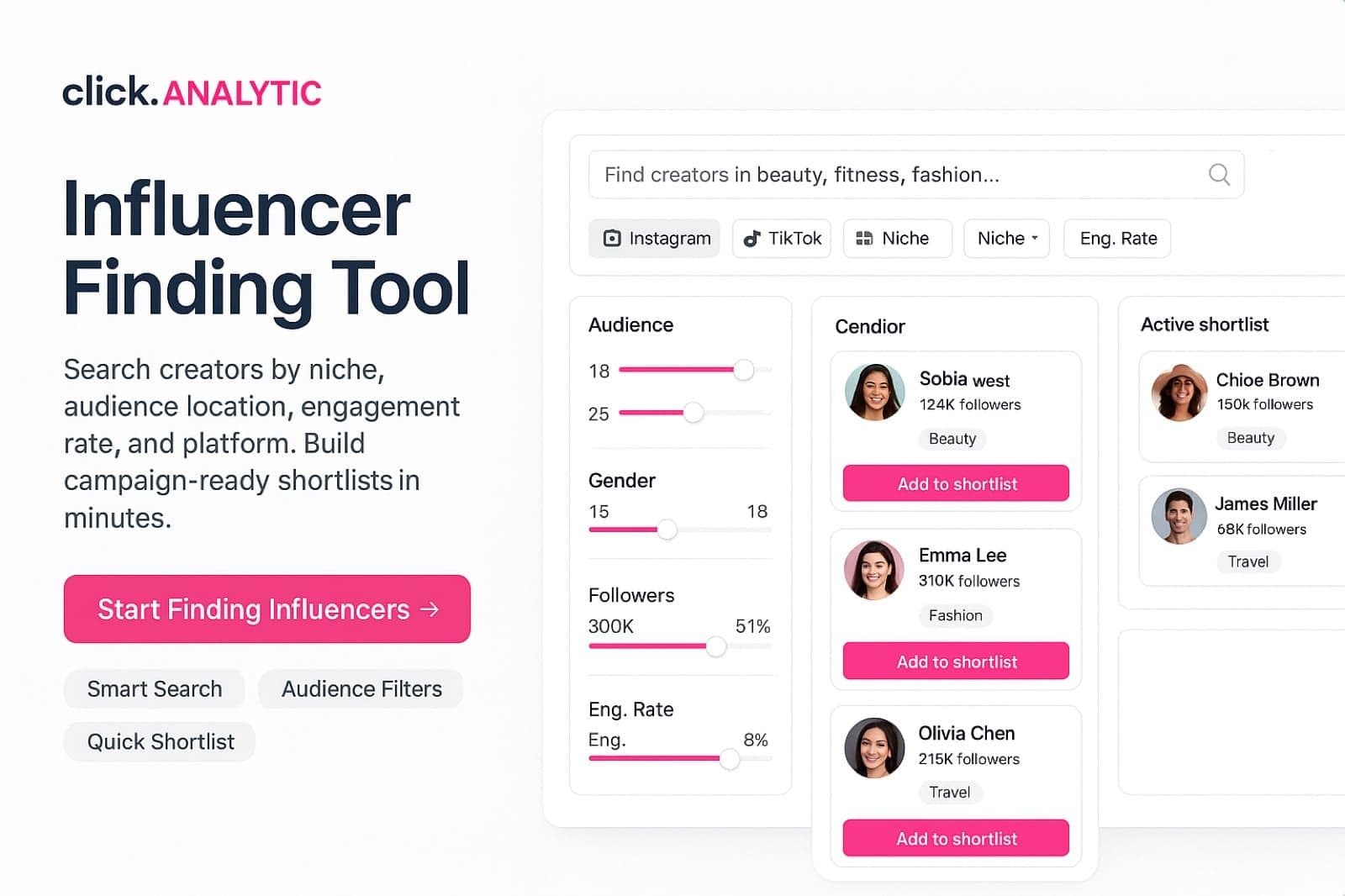
Beschrijf uw merk één keer: niche, land, taal, engagementdrempel, platform. Krijg een gerangschikte shortlist die past, geen top-100-lijst die dat niet doet.
★★★★★ 4.8 op G2 · ★★★★★ 4.8 op Capterra · 400M+ creators geïndexeerd in 195 landen
Geen creditcard · Elke dag gratis shortlists
"Top 100 creators" lijsten passen niet bij je merk
Een "top 100 beauty creators" lijst is gemaakt voor media-aandacht, niet voor je campagne. Drie vragen die zo'n lijst nooit stelt, bepalen de ROI.
Land van het publiek
Als je alleen in de VS levert en 60% van de volgers in Brazilië zit, converteert het budget nooit.
Taal van het publiek
Een Amerikaans merk heeft Engelstalige engagement nodig, niet alleen Engelse captions.
Niche echt of aangrenzend
Een "lifestyle" creator die twee keer per jaar over skincare post, is geen skincare creator.
Vijf filters die merkfit bepalen
Filters draaien op dezelfde 400M index die de bredere creatordatabase aandrijft. Het verschil is de merkfit-logica erbovenop.
Niche
Primaire contentcategorie met consistente topicdichtheid, niet één gesponsorde post.
Verdeling per land van het publiek
Percentage volgers in markten waar je daadwerkelijk verkoopt.
Taal van het publiek
De taal van het publiek, niet de taal van de creator. Tweetalige creators hebben vaak een eentalig publiek.
Minimale engagement rate
Stel een minimum in, zodat inactieve doelgroepen afvallen voordat je ze beoordeelt.
Platform
Instagram, TikTok, of YouTube. Filter op waar je koper zit.
Zo werkt het
Beschrijf uw merk
Niche, land, taal, minimale engagementdrempel, platform. Bewaar en hergebruik voor elke campagne.
Voer de zoekopdracht uit
Finder rangschikt op merkfit, niet op ruw aantal volgers.
Beoordeel de shortlist
Open elke creator inline, stuur topkeuzes naar verificatie of outreach.
Drie dagen vs twintig minuten
| Criterium | Handmatig | ClickAnalytic |
|---|---|---|
| Bron | Hashtag scrollen, agency-roosters, spreadsheet | 400M-index met filters voor brand-fit |
| Land van het publiek | Klik elk profiel handmatig aan | Eén filter over de shortlist |
| Taal van het publiek | Lees zelf de reacties | Percentage taalmatch per rij |
| Brand-fit logica | Onderbuikgevoel | Samengestelde score (niche, land, taal, engagement) |
| Tijd tot shortlist van 20 | 2 tot 3 dagen | 15 tot 30 minuten |
| Herhaalbaar | Nieuwe spreadsheet per campagne | Sla merkprofiel op, draai opnieuw met één klik |
Geliefd door marketeers en oprichters wereldwijd





3,500+
Marketeers vonden creators met ClickAnalytic
Zoektool voor merkfit, database en analyse vergeleken
Alles wat u nodig hebt, in één ClickAnalytic-abonnement
Doorzoek 400M creators
Doorzoek het volledige creator-universum met filters op niche, publiek, locatie, taal en engagement.
Merkfit-finder
Beschrijf je merk één keer. Ontvang een gerangschikte shortlist die past bij niche + land + taal.
Analyse van één creator
Bekijk één creator diepgaand: land van publiek, engagement, top posts, merkgeschiedenis.
Scorecard voor batch-vetting
Score 50 creators tegelijk aan de hand van een checklist met zes signalen en audittrail.
Nepvolgercheck
Herken verdachte volgerpatronen op elke handle in minder dan een minuut.
Openbare e-mailzoeker
Haal openbare contactgegevens op van creators die klaar zijn voor outreach.
Creator CRM
Sla creators op, tag op status, hergebruik shortlists over campagnes heen.
Campagne tracking
UTM-klikken, conversies, omzetattributie per creator en post.
Gratis tot u meer nodig hebt
Beperkte dagelijkse shortlists, volledige filterset, geen creditcard.
- Dagelijkse shortlistruns
- Volledige filterset
- Resultaten in de app
Onbeperkte shortlists, CSV-export, opgeslagen merkprofielen, teamplekken.
- Onbeperkte shortlists
- CSV + PDF-export
- Opgeslagen merkprofielen
- Teamplekken inbegrepen
Wat mensen vragen voordat ze zich aanmelden
Waarin verschilt dit van de creator-database?
Deze pagina is gerichte brand-fit discovery: beschrijf een merk, krijg een gerangschikte shortlist. De creator-database is ruwe zoekfunctie over dezelfde 400M-index voor power users die brede scans uitvoeren.
Heb ik een betaald account nodig?
Nee. De gratis tier draait elke dag volledige shortlists zonder creditcard.
Welke platforms?
Openbare profielen op Instagram, TikTok en YouTube.
Hoe nauwkeurig zijn percentages voor land en taal van het publiek?
Gebouwd op openbare engagementsignalen uit recente posts. Richtinggevend, niet op auditniveau. Controleer bij campagnes met hoge budgetten de topkeuzes handmatig.
Kan ik een merkprofiel opslaan?
Ja, op Pro. Opgeslagen profielen draaien de shortlist op aanvraag opnieuw wanneer de index wordt bijgewerkt.
Kan ik de shortlist exporteren?
Pro en hoger. De gratis tier toont de shortlist alleen in-app.
Stop met shortlists bouwen in een spreadsheet
Beschrijf je merk en krijg een gerangschikte shortlist waarvan de doelgroep echt past. Elke dag gratis. Geen creditcard.