
TikTok aspect ratio in 2026 is 9:16 (vertical), with a recommended resolution of 1080 × 1920 pixels.
This full-screen format is designed to fill the entire mobile display, avoid black bars, and maximize engagement on the For You Page.
But using the correct TikTok aspect ratio is only part of the equation ⚠️
If your dimensions, resolution, bitrate, or safe zones are wrong, TikTok may compress your video, crop key elements, or reduce its distribution.
With TikTok’s monthly active user base hitting 1.59 billion globally in early 2025, the algorithm frequently shoves down poorly formatted videos.
This figure is expected to reach 1.9 billion users in 2029, showing how competitive the platform will become.
Even small formatting mistakes can impact watch time and completion rate, two of the most important ranking signals in TikTok’s algorithm.
The real question is not just what size to upload… but:
How do TikTok video specs affect reach, retention, and performance?
In this complete 2026 TikTok aspect ratio size guide, you’ll learn 👇
✅ The exact TikTok aspect ratio in pixels
✅ TikTok video dimensions and resolution explained
✅ File size limits for iOS and Android
✅ Best video format and codec settings
✅ Optimal video length for engagement
✅ Safe zones to avoid text cropping
✅ Whether 4K uploads matter
✅ Landscape vs vertical performance
Whether you’re a creator, brand, or advertiser, this guide covers everything you need to optimize TikTok aspect ratio for maximum reach and quality.
Ready? Let’s go 👇
What Is the TikTok Aspect Ratio?
Many new creators ask, “What is the aspect ratio of TikTok?” without understanding its true meaning.
Basically, the aspect ratio is the ratio of a video’s width to its height.
In other words, “the aspect ratio of a video determines how much screen a video will use, how users will interact with a video, and how professional a video will look.” If you use the right aspect ratio, your video covers the entire screen without black bars, awkward zooming, or text cropping.
From a performance point of view, “The aspect ratio of a video has a direct impact on view time, completion rate, and engagement.”
What TikTok Aspect Ratio By Default?
💡By default, the aspect ratio for TikTok videos is 9:16 (as seen on the official TikTok guide), meaning videos are taller than they are wide.
This ratio aligns well with how users hold their phones. It is often referred to as the “TikTok ratio” or “TikTok aspect ratio” within creator tools and video editing software.
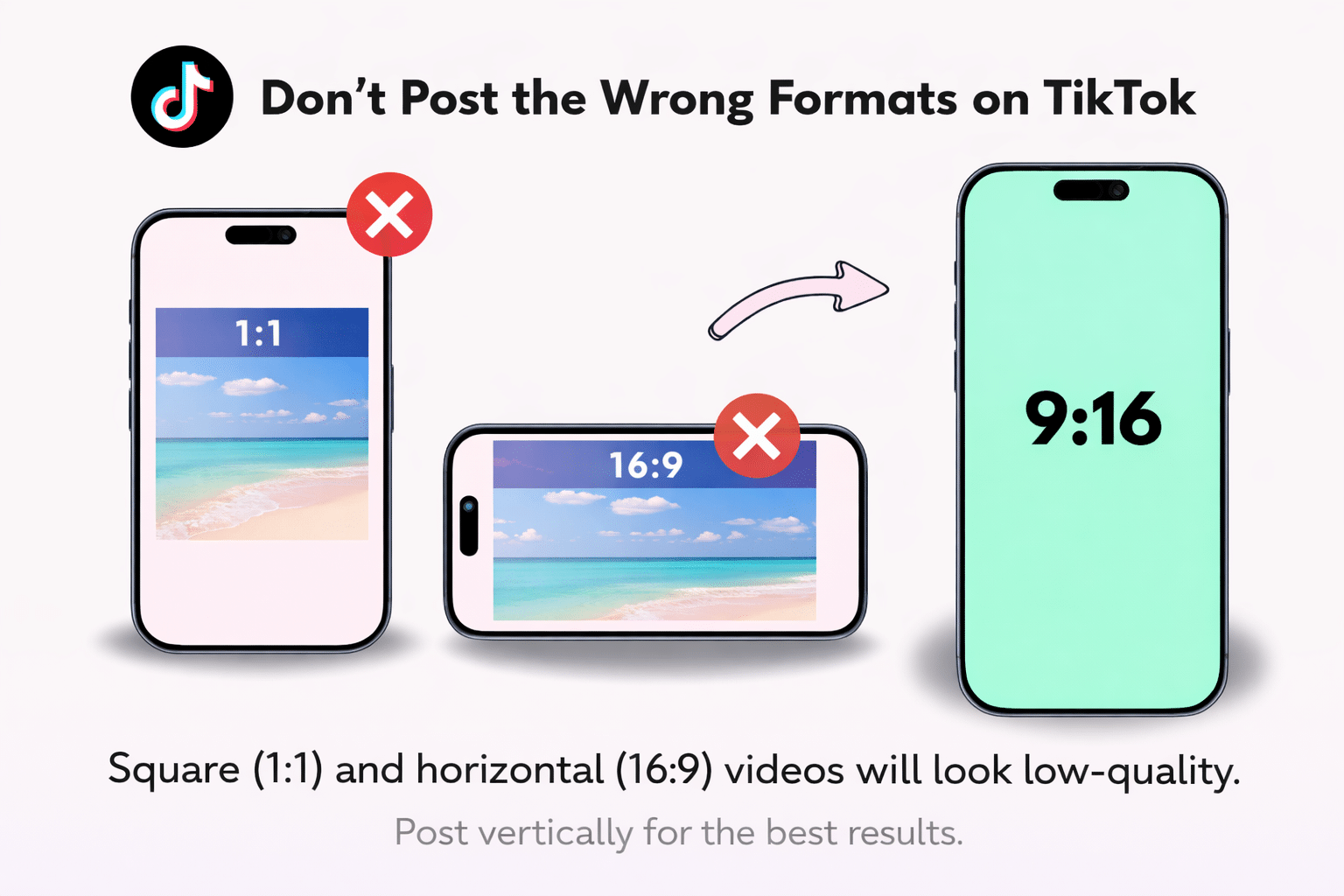
Although you can post videos shot in 1:1 (square) or 16:9 (horizontal) ratios, they will not produce clear, high-quality results.
If you are still looking to create Horizontal videos on TikTok and got for less optimal TikTok aspect ratio, check the tutorial below:
@the.leap Save this tutorial & start publishing #horizontalvideo to TikTok! 📹 #TikTokTips #TikTokTutorial #TikTokTrends #CreatorTips ♬ original sound – The Leap
You can understand the default TikTok aspect ratio, but understanding the meaning in pixels is also key 👇
What Is the TikTok Aspect Ratio in Pixels?
Knowing the ideal TikTok aspect ratio in pixels is essential too.
This is to avoid compression issues and ensure it is clear after upload. The video will not be resized if the export size matches the native TikTok video ratio.
The common sizes of the 9:16 video ratio are:
- 720 × 1280 (HD)
- 1080 × 1920 (Full HD, recommended)
- 2160 × 3840 (4K, downscaled by TikTok)
Now let’s look at TikTok aspect ration vs. other social media platforms like Instagram 👇
TikTok Aspect Ratio vs Other Social Platforms
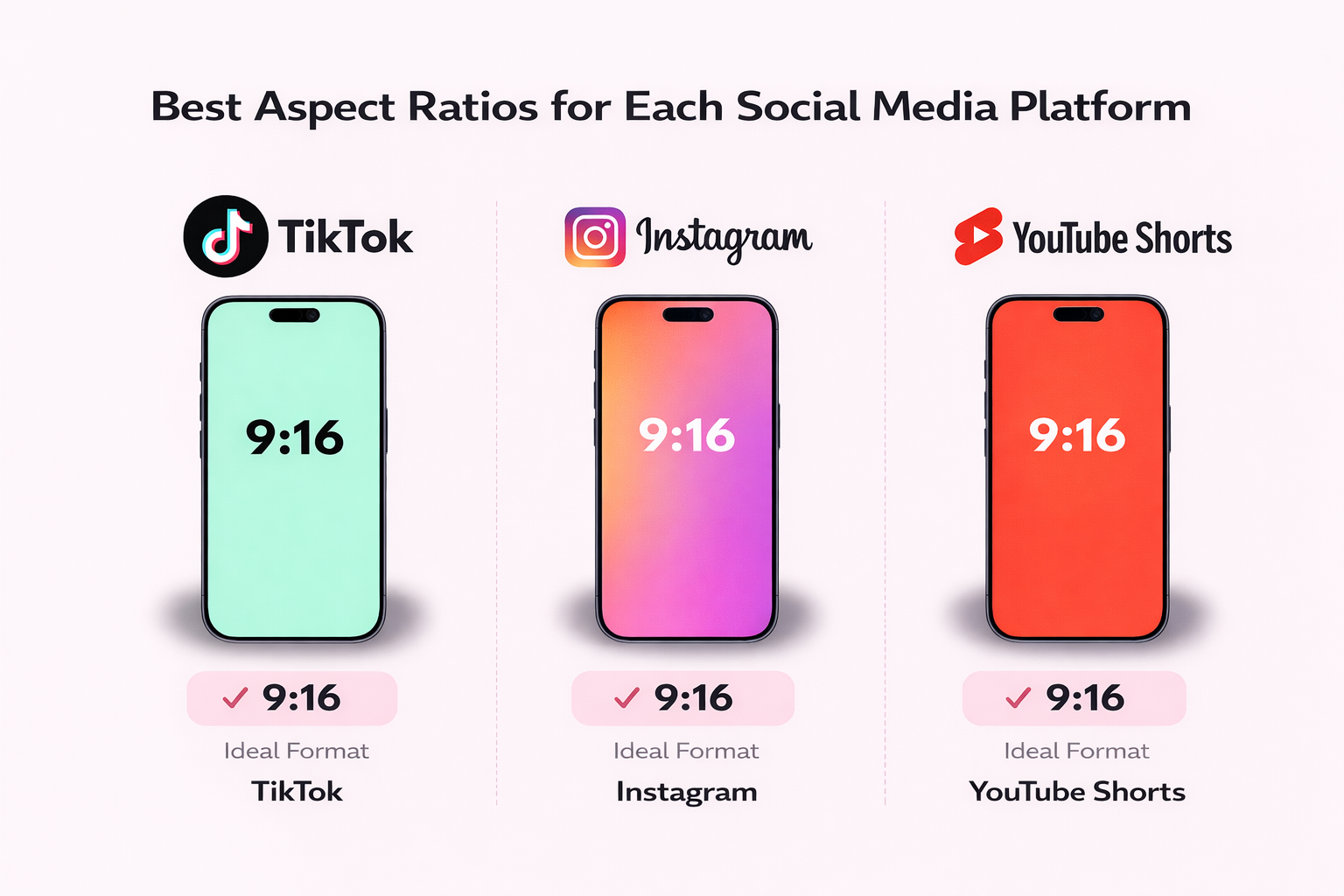
The TikTok platform is designed so that using other aspect ratios, such as square or landscape, may require adjustments to meet the standard. Therefore, the use of other formats may be subject to cropping. The similarities it has with other social media platforms include:
- TikTok: Rely on the use of the 9:16 vertical format.
- Instagram: Reels rely heavily on the use of the 9:16 format
- YouTube Shorts also relies heavily on the vertical format.
Now let’s look at the best TikTok aspect ratios, but also understanding social media user behavior when looking at TikTok content.
Best Aspect Ratio for TikTok Videos
Before we dive into the best TikTok aspect ratio, it’s important to understand human behavior, not just platform rules.
A large portion of global users (81%) watches vertical video on smartphones, and vertical formats tend to deliver roughly 2.5× higher engagement for short-form clips.
💡Since TikTok is built as a vertical-first platform, using 9:16 ensures your video fills the entire screen and avoids friction.
Therefore, for videos, the TikTok aspect ratio (1080 x 1920 pixels) remains the optimal size.
The full-screen viewing experience offered by videos that fill the entire smartphone display prevents the annoying black bars, and it makes videos look more native to the TikTok interface.
It helps increase view duration and view completion, two key engagement metrics the TikTok algorithm prioritizes when selecting videos for display.
Aside from that, 9:16 works best, as this format maximizes attention and algorithmic visibility, especially since the TikTok algorithm prioritizes content that encourages users to watch and scroll more on their For You Page (FYP). These types of content are optimal for reducing visual friction.
Research shows vertical video formats perform significantly better than horizontal formats on mobile platforms. For example, studies from Snapchat and mobile video researchers found that vertical video ads have up to 9× higher completed views than horizontal video ads, a trend driven by how users consume video on mobile devices, where vertical formats fill the screen natively.
In contrast, other formats on the platform include 1:1 (square) and 16:9 (horizontal). While trying these other formats, it is important to know that they may not deliver the quality you expect after posting.
A critical aspect regarding TikTok aspect ratio that marketers wants to know are regarding ads 👇
TikTok Aspect Ratio for Ads
TikTok ads follow the same 9:16 format as organic content.
However, advertisers must also consider:
- Ad safe zones
- CTA button overlays
- Caption space
- Spark Ads cropping
Recommended specs for TikTok ads:
- Aspect ratio: 9:16
- Resolution: 1080 × 1920
- File format: MP4
- Max length: 60 seconds (recommended 9–15 seconds)
Ads that fully utilize vertical screen space typically outperform horizontal creatives due to immersive design.
As TikTok continues evolving its commerce features (including new in-feed shopping formats), optimizing video dimensions becomes even more critical for performance. You can explore how TikTok is expanding video commerce in our breakdown of TikTok’s shoppable video feature.
Now let’s look at the TikTok aspect ration video dimensions 👇
TikTok Video Dimensions (Width and Height Explained)
TikTok videos only perform well when they look right on screen. Using the correct video dimensions helps your content appear sharp and professional. Before you upload any video, you need to understand TikTok’s width and height rules.
TikTok Video Dimensions in Pixels
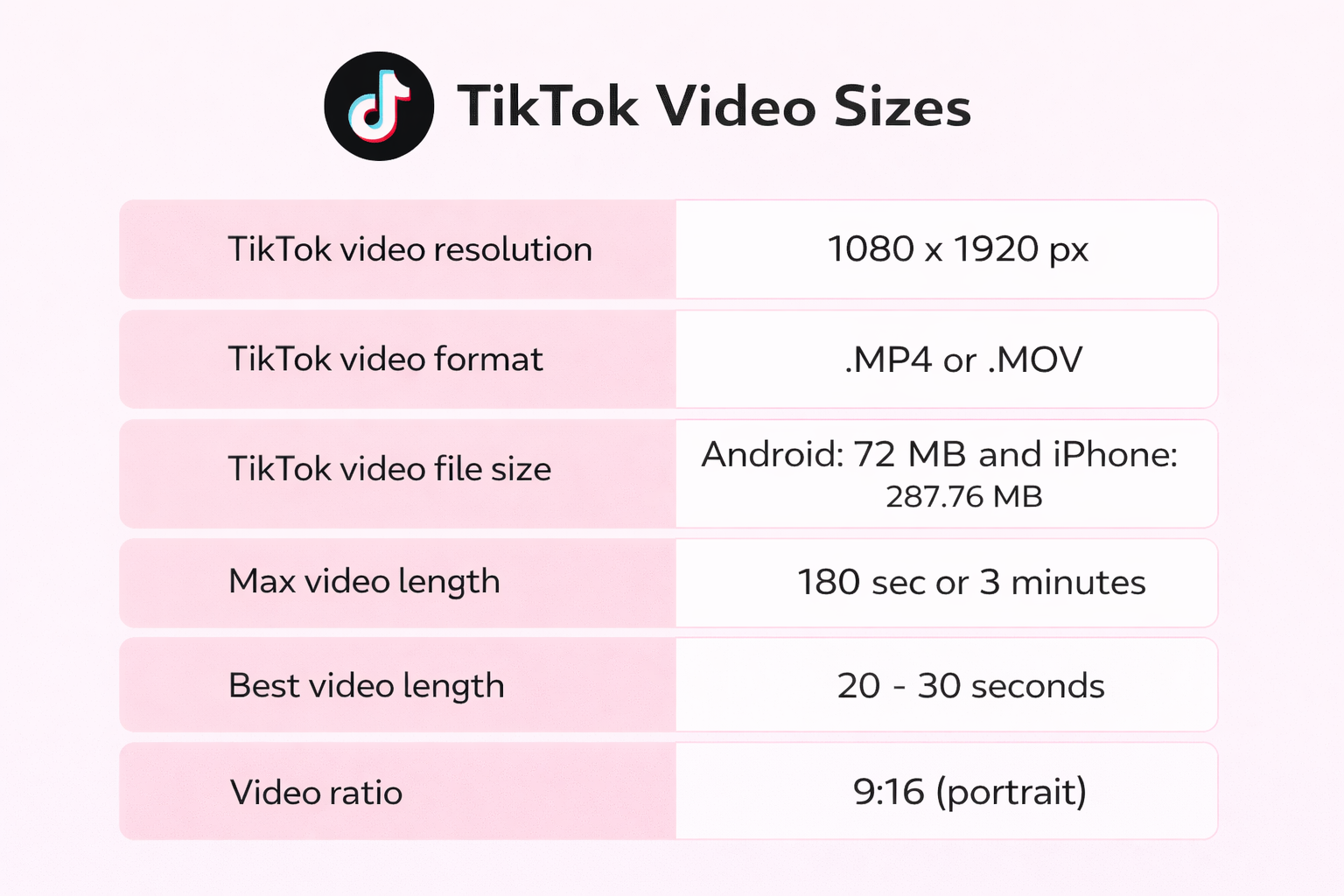
💡The recommended resolution for TikTok video uploads is 1080 × 1920 pixels (9:16 TikTok aspect ratio). It provides an optimal balance of picture quality and file size, which in turn affects loading time for mobile viewers browsing the “For You Page” in the TikTok app.
Using the correct resolution ensures your video or image isn’t degraded, especially since a lower-resolution video (for instance, 480p or 720p) will appear blurry.
On the other hand, higher-resolution images (4 K or higher) will be automatically downsampled to 1080×1920.
Even though your video is the optimal size, you must also consider TikTok’s safe zones, where captions, usernames, likes, comments, and the share button will overlap with your video.
If you want to make sure that no important video content gets cut out, place the center point of essential content (such as text or human faces) no less than 150 px from the top, 250 px from the bottom, or 130 px from the sides.
TikTok Canvas Size and Frame Size
Next, it is necessary to understand the canvas and frame sizes to avoid awkward cropping or poorly framed videos. The canvas refers to the screen or the environment within the editing software, such as CapCut, Premiere Pro, or Final Cut.
The canvas should be 9:16 (1080×1920 pixels) for TikTok. This ensures the edited content appears exactly as it does in the TikTok app. The frame, also known as the export frame, refers to the final edited video being uploaded.
When the canvas and frame sizes differ, TikTok automatically resizes the video. This may cause the content to zoom or be cut off within the frame. Videos with a horizontal TikTok aspect ratio, such as 16:9, will be zoomed, resulting in the sides being cropped.
Videos with a square frame, such as 1:1, will be shrunk vertically. The best way to avoid this is to ensure the canvas and frame are the same.
TikTok Video Sizes
TikTok videos come in different sizes and dimensions, which can affect their overall appearance. Users can upload content using the following video sizes:
🚦 Vertical: The native 9:16 video format. It performs best on the platform, with a resolution of 1080×1920 pixels. Vertical videos consume the entire screen, are intuitive to scroll through, and do not have black bars or cropped content.
🔲 Square: They are 1:1 videos and have a resolution of 1080×1080 pixels. They are allowed on TikTok but do not utilize the entire screen on mobile devices. TikTok adds padding to the video, making it appear smaller and less immersive.
🌆 Landscape: With a resolution of 1920×1080 pixels and a size of 16:9, they are the least ideal on TikTok. They are displayed with letterboxing or are automatically cropped, often removing important information.
TikTok Dimensions Table (Quick Reference)
You can post in various dimensions on TikTok; a few yield the best quality after publishing. Other video dimensions will not give you full-screen playback, as the following listed below:
| Cas d'utilisation | Width (px) | Height (px) | Aspect Ratio | Orientation |
| Standard TikTok video | 1080 | 1920 | 9:16 | Vertical |
| TikTok feed post | 1080 | 1920 | 9:16 | Vertical |
| Square upload (supported) | 1080 | 1080 | 1:1 | Square |
| Landscape upload | 1920 | 1080 | 16:9 | Horizontal |
TikTok Safe Zone (Avoid Cropping & Hidden Text in 2026)
Even if you use the correct TikTok aspect ratio (9:16) and resolution (1080 × 1920 px), your content can still lose visibility if important elements fall behind TikTok’s interface.
TikTok overlays buttons, captions, and UI elements on top of your video.
If your text, subtitles, or call-to-action sit in the wrong area, they may be partially hidden (reducing clarity and engagement, all because of a TikTok aspect ratio mistake).
Where TikTok Interface Elements Appear
On most devices, TikTok’s UI covers:
👉 The right side vertical area (like, comment, share icons)
👉 The bottom 250–300 pixels (caption + username + music info)
👉 The top area (profile name and follow button)
This means your effective “safe zone” is slightly smaller than the full 1080 × 1920 canvas.
TikTok Safe Zone Guidelines (2026)
This is critical for TikTok aspect rations / to avoid cropping or hidden text:
✔️ Keep key text at least 250 px above the bottom edge
✔️ Avoid placing text within 130 px from left or right edges
✔️ Center faces, headlines, and CTAs
✔️ Keep subtitles slightly above the lower UI bar
Why the Safe Zone Matters
When important visual elements are blocked because of TikTok aspect ratios:
❌ Viewers struggle to read your message
❌ Completion rate drops
❌ Watch time decreases
❌ Engagement signals weaken
Let me share an example…
A creator uploads the same video in two formats:
➡️ Version A: 16:9 landscape
➡️ Version B: 9:16 vertical
The vertical version fills the screen and avoids black bars, leading to higher retention and clearer CTA placement.
Even minor framing improvements can significantly increase average watch time (one of TikTok’s strongest ranking signals).
Since TikTok’s algorithm heavily prioritizes watch time, replays, and completion rate, respecting the safe zone directly impacts distribution.
Optimizing the TikTok aspect ratio alone is not enough; positioning within the frame matters just as much.
TikTok Resolution and Video Quality Guide
Video resolution is a HUGE factor in making the content you produce look professional.
Even if the video concept is good, poor video quality may prevent users from engaging with the content. Therefore, it is equally important to know the resolution of the videos you produce, just like the TikTok aspect ratio and the length of the videos.
What Is TikTok Resolution?
The resolution of a TikTok video is the number of pixels used to display it. It is usually specified as width x height. It determines the video’s sharpness and is completely different from the video’s aspect ratio, which only indicates its shape; resolution determines how sharp the video is.
When people ask what the TikTok resolution is, they want to ensure the video is not blurred or pixelated. TikTok supports videos at various resolutions, but videos with too high a resolution will be heavily compressed. Also, the resolution on the platform is usually tied to the TikTok aspect ratio.
Therefore, having the right video shape is not sufficient; the resolution must also be appropriate. Without the right resolution, necessary parts of your content like text and info graphics will be hidden by TikTok’s native features.
Best Resolution for TikTok Videos
💡 The optimal resolution for TikTok is 1080 × 1920 pixels (vertical 9:16). This 1080p resolution is ideal because it is the native resolution for the 9:16 TikTok aspect ratio (vertical videos), and it allows for a clearer image without compressing the videos uploaded to the site excessively. This is also the ideal resolution and ratio for any professional TikTok creator.
Does TikTok Support 4K?
While TikTok technically supports 4K, there’s a difference between uploading a video in 4K and playing it back in 4K on TikTok.
TikTok users can technically upload videos at 3840×2160 (4K) resolution, specifically when uploading from a PC or a flagship phone.
The majority of users will never watch 4K content at 4K resolution, since TikTok is designed to be convenient.
Basically, users watch on mobile devices, and internet connection speeds are usually not fast enough for 4K streaming.
Stream-quality settings for most devices typically start at 1080p or lower. And that’s where downscaling comes in. When someone uploads a 4K video to TikTok, it is compressed and downscaled to popular TikTok playback formats, such as the 1080×1920 standard vertical format.
Despite the slight advantage of uploading in 4K for image quality after compression, exporting directly in 1080p, 9:16 has the benefit of lower file sizes, faster export times, and fewer compression artifacts, all while still delivering the same image most people will actually see on their For You Page.
TikTok Bitrate Size Explained
Another key factor affecting resolution is bitrate, the number of bits used to encode one second of video. If the subject of the video moves, the creator must use a high bitrate, or the video quality may be reduced when TikTok compresses it for its platform.
The lower the bitrate, the worse the video quality; the higher the bitrate, the more TikTok compresses the video. Thus, it is best to use a bitrate of 8-12 Mbit/s with 1080p resolution.
TikTok Video Size and File Size Limits
A solid foundation of the video and file size limits before posting will help you maintain a consistent stream of posts on your page and draw viewers to your high-quality content, thereby boosting your engagement.
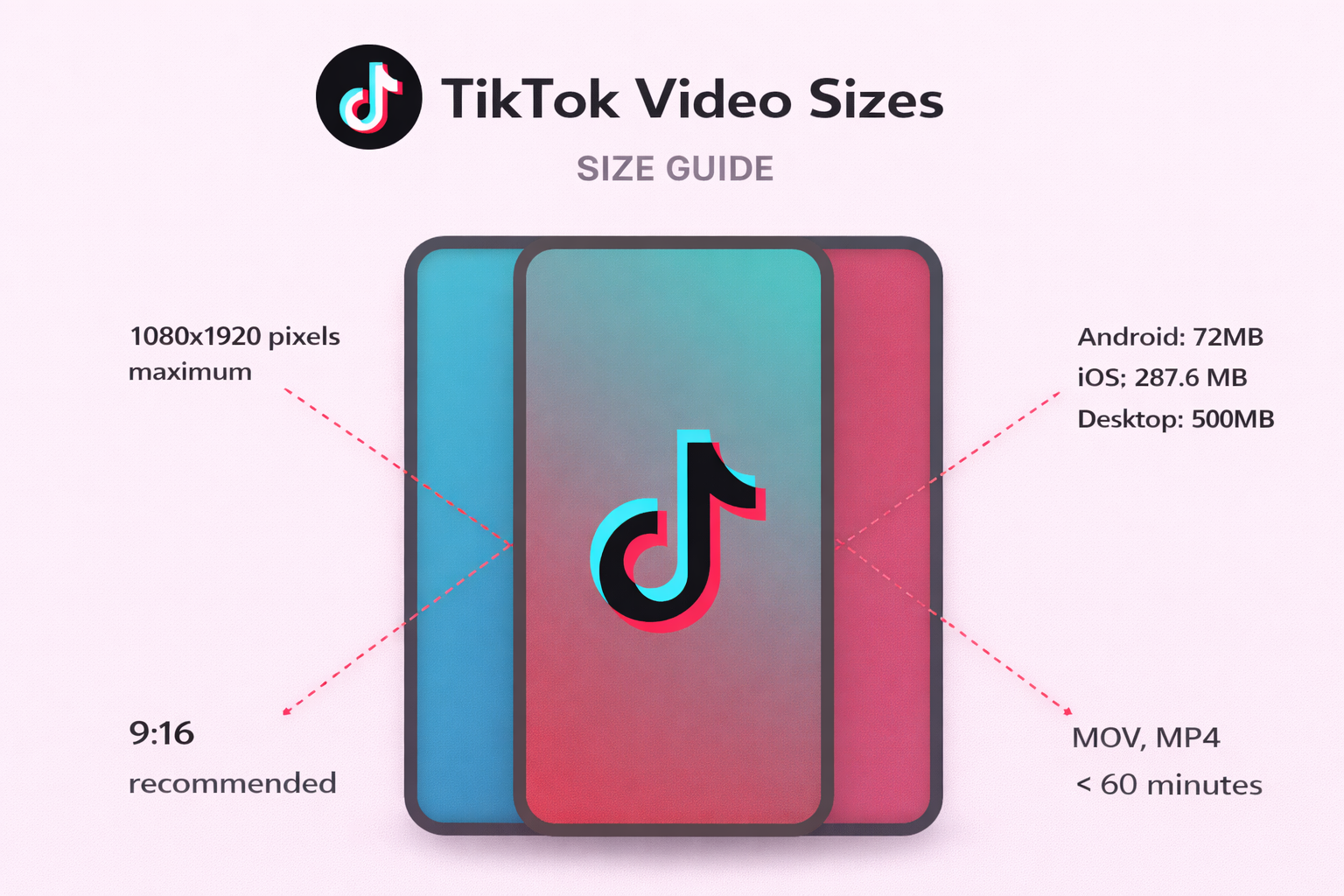
Even if you have well-edited videos, they might not work or may not look as good as they should if they go against these limits. It’s common knowledge that TikTok will “automatically adjust” videos that are too big.
TikTok File Size Limit (Android vs iOS)
The file size limit for TikTok varies by device. As of early 2026, the limit for iOS devices is higher than that for Android devices.
- iOS: Up to 287.6 MB per video
- Android: Up to 72 MB per video
Why TikTok Has File Size Restrictions
Some of the reasons TikTok imposes these limits include:
- Storage Management: TikTok’s storage management system handles trillions of videos stored on its servers. Restricting file sizes can help control storage costs and ensure the platform’s scalability for millions of videos uploaded daily.
- Streaming Optimisation: Mobile-first platforms like TikTok are designed to load videos quickly and play them smoothly, irrespective of internet speeds. Restricting file sizes can help videos load quickly and play smoothly.
How to Reduce TikTok Video Size Without Losing Quality
- Export at 1080×1920 (9:16) resolution; do not upload 4K footage unnecessarily.
- Opt for optimised codecs such as H.264 with a balanced bitrate.
- A slight bitrate reduction is preferable to a resolution reduction for a smaller file size.
- Unwanted audio tracks should be removed, and excessive effects should be avoided.
- The final export preview should be done to check for clarity and smoothness.
- Follow TikTok’s recommended specs to ensure smooth, clear video uploads.
TikTok Video Format and Upload Specs
Video format is the most overlooked yet critical factor in how well a TikTok video performs. Videos shot to perfection can easily be pixelated or not uploaded to TikTok at all if the video format, codec, or bitrate is not optimised for TikTok.
Best Video Format for TikTok
The best video format for TikTok is MP4; it is the top recommendation as of 2026. This format ensures the best balance of quality and compression that is compatible with Android and iOS devices. Although the MOV format is also compatible, it is larger and will require compression.
Also, when comparing MP4 and MOV, the creator will find that MP4 uploads faster and preserves image quality, since most export presets labeled as TikTok default to MP4.
TikTok Video Codec Requirements
The basic TikTok upload requirements include:
👉 VideoCodec: The required codec for TikTok videos is H.264. It is a highly efficient codec that balances file size and video quality.
👉 Audio Codec: AAC (Advanced Audio Codec) is the required audio codec for TikTok videos, providing the best quality at the smallest possible file size.
How Long Can a TikTok Video Be?
The actual length of a TikTok video has no definitive answer. While TikTok was initially a short-form video-sharing app with a minimum length of 7 seconds, it has since evolved to allow creators to make longer videos as well. However, video length is a significant factor affecting video performance, completion rate, and related metrics.
TikTok Maximum Video Length
Basically, most sources say the max is 10 minutes, but that only applies to videos you post directly. In other cases, you can upload videos that are longer than 10 minutes when you repost videos from other sources or share videos. Regardless, 10 minutes remains the maximum length for most users.
Industry reports indicate that short-form videos under 30 seconds often achieve completion rates above 60%, while longer videos tend to drop below 40% unless highly engaging (Influencer Marketing Hub 2025).
Optimal TikTok Video Length for Best Engagement
We strongly recommend you use a 10-minute-long video on occasion, while you use many short videos regularly. That’s because in most cases, shorter, better-structured videos are more successful, unless there is a compelling reason to create or watch a longer video. On average, viewers decide within an instant whether to continue watching the video.
Therefore, the optimal TikTok video length to gain the most engagement for most TikTok users is 15 – 35 seconds. This is because you can engage the audience, convey your message, and finish before they become fatigued or bored with the video’s length.
Optimal TikTok Video Length by Content Type
Video types vary in their optimal video length. Trends work best within a 7-15 second window, where repetition and video looping help increase views. Tutorials also work well within a 30-60-second window, when users expect step-by-step content.
Ads work best when they are under 20 seconds, especially when the hook is within the first three seconds of the video. Storytelling content can run 45-90 seconds, especially when it is well-paced and keeps users engaged.
How Video Length Affects the TikTok Algorithm
The TikTok algorithm favors content with high watch time and completion rates. Short videos are easier to watch to the end, which increases completion rates. Long videos must maintain users’ attention throughout, which is not always the case.
The more users can watch and even re-watch your content, the higher the chances that TikTok will show it to a larger audience. Length doesn’t win, retention does.
TikTok Performance Benchmarks (2026)
Understanding TikTok aspect ratio and video specs is only useful if it connects to performance.
To measure whether your formatting and creative choices are effective, you need benchmarks.
Below are recent industry figures that help contextualize TikTok video performance in 2026:
Average TikTok Engagement Rate
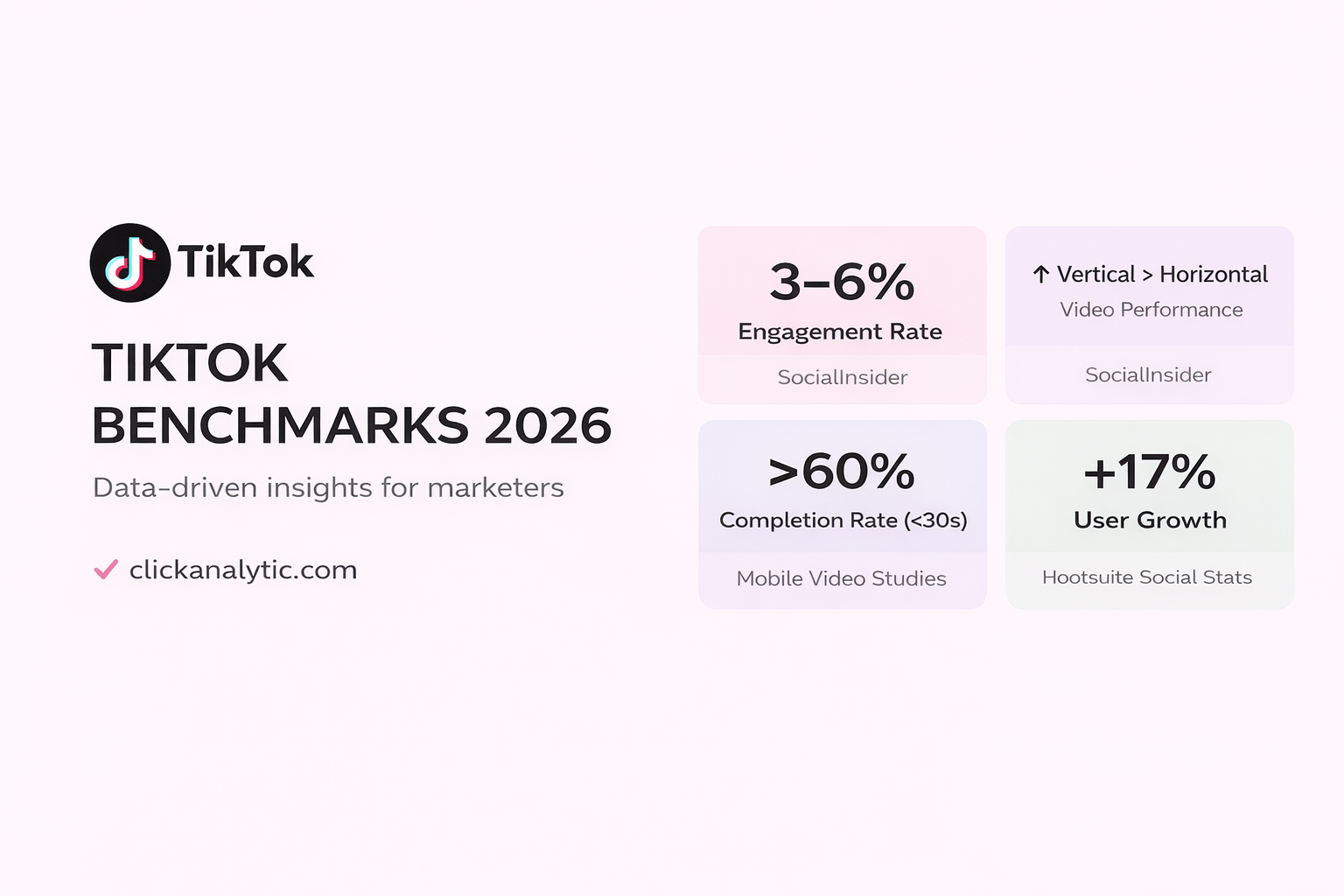
TikTok continues to outperform most social platforms in engagement. Recent benchmark reports estimate the average engagement rate on TikTok to range between 3% and 6%, significantly higher than Instagram or Facebook.
Not sure whether your numbers are competitive?
Here’s a detailed breakdown of what is considered a good TikTok engagement rate across industries and account sizes.
This reinforces why optimizing video format, resolution, and aspect ratio is critical; small improvements in watch time or clarity can compound quickly at scale.
If you want a deeper understanding of how trends and creative formats impact engagement performance, read our full TikTok trends and engagement rate guide
Vertical Video Performance
Research consistently shows that vertical video formats perform better on mobile platforms.
Some studies indicate that vertical videos generate significantly higher completion rates and engagement compared to horizontal formats, due to full-screen immersion and reduced friction.
Since TikTok is designed natively for vertical viewing, using the 9:16 aspect ratio aligns with how users consume content.
Short-Form Completion Rates
Industry research suggests that short-form videos under 30 seconds often achieve completion rates above 60%, while longer videos see declining retention unless highly engaging.
Because TikTok’s algorithm prioritizes watch time and completion rate, optimizing both video length and framing increases distribution potential.
Why Benchmarks Matter for TikTok Specs
Using the correct TikTok aspect ratio (9:16), resolution (1080 × 1920), and safe zone positioning improves:
- Completion rate
- Heure de la montre
- Replay rate
- Early engagement velocity
These signals directly influence how widely TikTok distributes your content on the For You Page.
Benchmarks turn technical settings into strategic decisions, helping you evaluate whether your video specs are supporting performance or limiting it.
Can You Post Landscape Videos on TikTok?
Posting a landscape video on TikTok is possible, but it doesn’t mean you should. TikTok is built for an immersive experience so that users will see your videos in full-screen mode. Posting a landscape video will not look the same if you post it on the site, as it is not built to minimise landscape videos.
Once you upload a landscape video, some adjustments will be made to it, which may affect the final quality of the content.
Supported Landscape Aspect Ratios
There are basically two aspect ratios on TikTok that support landscape. These two ratios are 16:9 and 1:1. The 16:9 ratio is the standard video TikTok aspect ratio for horizontal video content. On the other hand, the 1:1 ratio falls between the two. It is a balanced aspect ratio for video content.
However, the two ratios will be displayed with some unused space when the video content is in a vertical mode. Therefore, the video content size in a landscape mode will not be fully displayed on the screen.
Pros and Cons of Landscape Videos on TikTok
Landscape is acceptable for cross-posting or for specific types of content, but tends to underperform in watch time and algorithmic visibility compared to the more popular 9:16 vertical video.
| ✅ Pros | ❌ Cons |
|
|
How to Optimise Landscape Videos on TikTok
When optimising your videos, start by optimising your framing. All TikTok videos are displayed in a 9:16 TikTok aspect ratio, so when working in landscape, ensure all crucial information is centered. You can use closer camera angles or slightly zoom in on your subject.
Why Does TikTok Reduce My Video Quality?
If you’ve shot a video sharply and cleanly, but it comes out fuzzy and pixelated in the feed after uploading, you’re not doing anything wrong. The short answer is that every time you upload a video, TikTok processes it to strike a balance between quality and file size for streaming across all devices.
Common TikTok Video Size and Ratio Mistakes
Below are some common mistakes most creators tend to make when uploading content on TikTok:
❌ Wrong TikTok aspect ratio
❌ Wrong pixel dimensions
❌ Mixing up ratio and resolution
❌ Designing content outside the safe zones
❌ Uploading videos directly from YouTube and Instagram
❌ Using TikTok to fix the video
❌ Not following TikTok’s video standards
Don’t make those mistakes when looking at the right TikTok aspect ratio!
TikTok Thumbnail, Cover, and Profile Picture Size
Videos are important in this application; however, you should know that images play a role in determining the click-through rate of your content and how your content looks when you share it. This application aggressively crops and compresses images.
Therefore, you should know the image dimensions for thumbnails, cover images, and profile pictures. Each of these image types has different requirements.
TikTok Thumbnail Size Explained
The size of a TikTok thumbnail depends on a 9:16 TikTok aspect ratio, which corresponds to a vertical resolution. The platform normally uses a thumbnail from your own video, but you can choose your own thumbnail or use a custom image. The recommended resolution should be 1080 x 1920 pixels.
The most important aspect to consider regarding thumbnails is cropping. The platform will center your thumbnail based on where it is displayed. To prevent your thumbnail from being cropped, place the text and face elements centrally.
Using the correct TikTok thumbnail size prevents blurriness, while using the correct photo size prevents pixelation.
TikTok Cover Size for Videos
TikTok’s default video cover size is 9:16, but videos can appear differently on your profile grid. Once uploaded, only the center part will be fully visible. We strongly recommend that you place your titles and faces in the middle area, the safe zone.
Although your TikTok post meets the required dimensions, it will look messy if you don’t design it with the cover in mind.
TikTok PFP Size and Image TikTok Upload Requirements
TikTok applies automatic compression to all profile images with pixel dimensions above 400×400. Consider the following tips for your PFP size.
- Use a square image (1:1 TikTok aspect ratio)
- Recommended size is 200 × 200 pixels or higher
- Profile pictures are displayed in a circular frame
- Supported formats are JPG and PNG
- PNG works best for logos and text
- JPG is ideal for photos and portraits
- Upload a clear, high-resolution image
- Avoid using images that were previously compressed
- Image quality affects clarity more than screen size
Final Thoughts: Choosing the Right TikTok Video Specs
TikTok video specifications affect how your content looks, loads, and performs in the app. TikTok is designed for a full-screen vertical view with a quick load time, so videos that use the app’s recommended aspect ratios, resolutions, and formats will feel more native and look more professional.
To create the best export settings for videos with a resolution of 1080 x 1920, creators should export their videos as a 9:16 video in MP4 format, using the H.264 codec to balance file size and TikTok’s playback system. It also prevents text, faces, or logos from being cut off or pixelated.
Of course, great content is still king. But if you use the right specifications, you’ll reap the rewards from both viewers and the algorithm with a more polished look. Correct video specifications give the video the best chance of appearing on the For You Page.
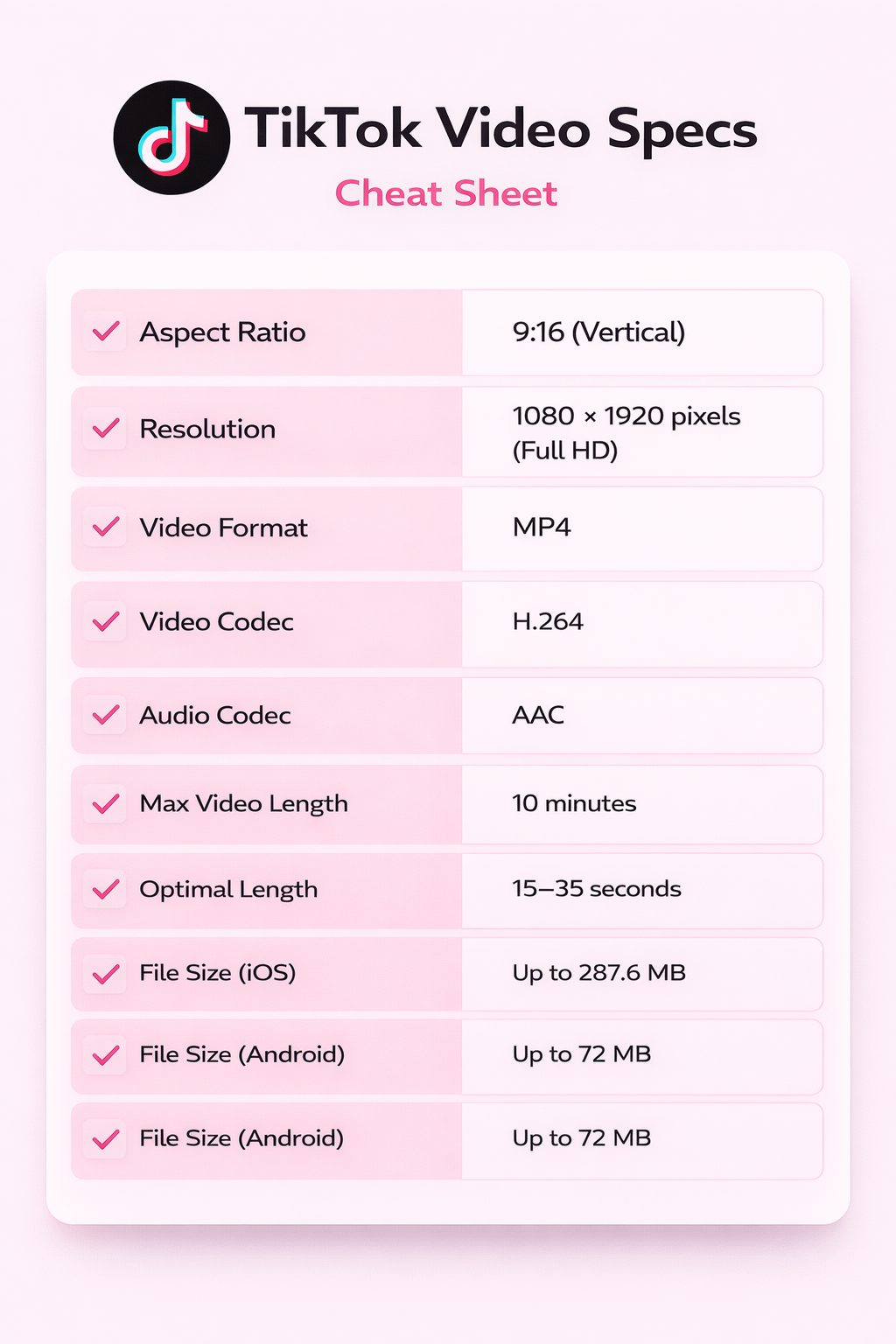
TikTok Video Specs Cheat Sheet
Understanding the correct TikTok aspect ratio, resolution, and upload settings is essential if you want your videos to look sharp and perform well on the For You Page.
While TikTok video specs may seem technical, small mistakes in dimensions, format, or bitrate can reduce quality and impact engagement.
This 2026 TikTok specs cheat sheet summarizes everything you need in one place…
➡️ From the ideal 9:16 aspect ratio to resolution, file size limits, codecs, and to optimal video length, so that you can export confidently and avoid compression issues.
TikTok Aspect Ratio – FAQs
What Aspect Ratio Is TikTok?
The most common aspect ratio on TikTok is 9:16, as it fills the smartphone screen and is widely considered optimal. Videos filmed in this aspect ratio do not have black bars, cropping, or zooming issues, and are favored by the platform’s algorithm.
Best Resolution for TikTok
1080 x 1920 pixels (Full HD) is the best resolution for TikTok. This resolution matches TikTok’s preferred 9:16 aspect ratio and keeps the video at a reasonable size without unnecessary compression.
Does TikTok support 4K?
Yes, TikTok allows posting 4 K videos and higher, but playback on most devices is downscaled to 1080 x 1920.
What is the best video format for TikTok?
The best video format for TikTok creators is MP4, with H.264 video and AAC audio. It’s important to also note that TikToks filmed in vertical format have been shown to perform 61% better in engagement, showing the importance of format and framing
What is the TikTok file size limit?
For your video to be uploaded correctly to TikTok, ensure the video file size you want to upload does not exceed the maximum file size allowed by your device.
💡On iOS devices, the maximum video file size is 287.6 MB; on Android, it is 72 MB.
For example, a 30-second 1080 × 1920 video exported at an 8 Mbps bitrate typically results in a file size of around 30–35 MB, which is safely within TikTok’s iOS and Android limits.
Why does TikTok reduce my video quality?
TikTok compresses videos uploaded to its platform to a size manageable by all devices and internet speeds, allowing videos to load faster and play more smoothly on slower mobile data.
Does TikTok prefer 9:16 over 16:9?
Yes. TikTok is designed for vertical full-screen viewing. While 16:9 is supported, it does not utilize the full screen and may reduce engagement.
What happens if I upload the wrong aspect ratio to TikTok?
TikTok automatically resizes or adds padding, which can cause black bars, cropping, or reduced immersion.
Should I export in 4K for TikTok?
Uploading in 4K is allowed but unnecessary. TikTok compresses most videos to 1080p playback resolution.