Vous avez découvert la nouvelle interface utilisateur d'Instagram ? Voici tout ce que vous devez savoir
Instagram déploie une refonte majeure - et cette fois, elle n'est pas seulement esthétique.
La nouvelle mise à jour de l'interface utilisateur d'Instagram marque un changement dans la façon dont la plateforme souhaite que les utilisateurs naviguent, partagent et se connectent. Que vous ayez déjà remarqué que vos Reels et DMs sont différents ou que vous vous demandiez pourquoi Instagram a changé sa mise en page, ce guide couvre tout ce que vous devez savoir sur la mise à jour de l'interface 2025.
Voici ce qu'il faut rechercher et pourquoi c'est important.
Ce qui change dans la nouvelle interface d'Instagram
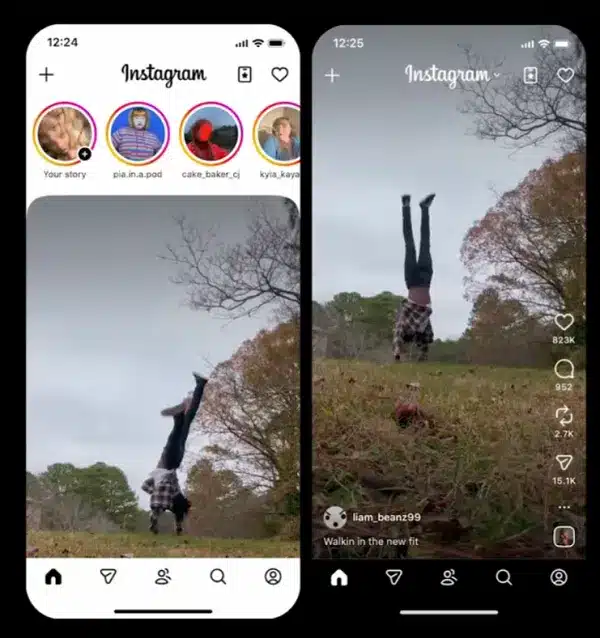
Instagram a commencé à tester une nouvelle barre de navigation et une nouvelle expérience de flux qui placent les Reels et les DM au premier plan - signalant l'accent renouvelé de la plateforme sur les vidéos de courte durée et les messages directs.
Tel que rapporté par Les médias sociaux aujourd'hui, Depuis le lancement de l'application, de plus en plus d'utilisateurs sont invités à essayer la nouvelle présentation, qui met l'accent sur “vos espaces préférés” au sein de l'application.
Comme vous pouvez le voir dans cet exemple, posté par l'expert en économie de la création Lia Haberman, Dans le cadre de ce test, les utilisateurs sont invités à indiquer s'ils souhaitent donner la priorité à des sections telles que Reels, DMs ou leur profil, ce qui leur permet pour la première fois de personnaliser la navigation principale d'Instagram.
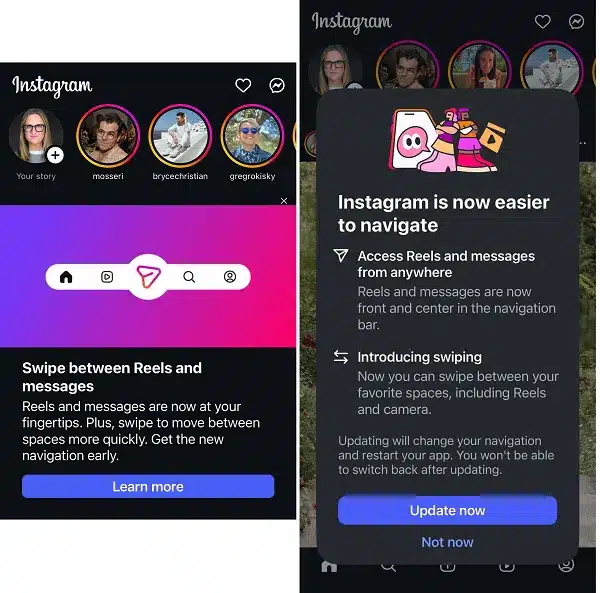
À propos de la nouvelle interface utilisateur d'Instagram : Adam Mosseri, responsable d'Instagram, a confirmé que cette fonctionnalité serait bientôt déployée pour tous les utilisateurs, écrivant sur Threads :
“Nous expérimentons des moyens de rendre Instagram plus personnel - en vous donnant un accès rapide aux parties de l'application que vous utilisez le plus, qu'il s'agisse des DM, des Reels ou de votre profil.”
Ce test s'inscrit dans la stratégie plus large de Meta visant à faire en sorte qu'Instagram ressemble davantage à une plateforme axée sur la messagerie et les centres d'intérêt, plutôt qu'à un flux statique.
La nouvelle présentation d'Instagram en un coup d'œil
Basé sur le déploiement actuel de la nouvelle interface utilisateur d'Instagram :
👉 Ordre de navigation inférieur : Home → Reels → DMs → Search → Profile
👉 Navigation par balayage : Les utilisateurs peuvent désormais passer horizontalement d'un onglet à l'autre, ce qui améliore la fluidité de l'application.
👉 L'expérience de la première bobine : Dans certaines régions, dont l'Inde et la Corée du Sud, l'application s'ouvre directement sur l'onglet Reels.
👉 Contrôle de l'algorithme : Les utilisateurs peuvent personnaliser les bobines qu'ils souhaitent voir grâce à la nouvelle fonction “Your Algorithm” (votre algorithme), ce qui donne au public plus de contrôle et aux créateurs moins de garantie d'exposition.
👉 L'alimentation n'est pas une priorité : Le flux “traditionnel” n'est plus qu'à quelques clics de souris, ce qui fait des Reels et des DM les nouveaux centres de découverte et d'interaction.
Nouvelle fonctionnalité : “Contrôles ”Votre algorithme
L'un des ajouts les plus significatifs à la nouvelle interface d'Instagram est la fonction “Votre algorithme”. Cette mise à jour vous permet de personnaliser votre expérience des bobines en fonction de vos préférences de contenu.
Pour y accéder :
- Allez dans l'onglet Reels
- Appuyez sur l'icône “2 cœurs” dans le coin supérieur droit.
- Choisissez ce que vous voulez voir en plus ou en moins
- Ajoutez des étiquettes personnalisées pour refléter vos centres d'intérêt
Cette fonctionnalité donne aux utilisateurs un contrôle sans précédent sur le contenu qui apparaît dans leur flux, ce qui modifie fondamentalement le fonctionnement de l'algorithme d'Instagram dans la nouvelle interface utilisateur.
Pourquoi Instagram a-t-il modifié sa mise en page ?
La mise à jour de l'interface utilisateur d'Instagram est censée refléter la façon dont les gens utilisent réellement l'application.
Des données internes montreraient que plus de 50% du temps total passé sur Instagram est consacré aux Reels ou aux DM - il n'est donc pas surprenant que la plateforme s'adapte pour rendre ces fonctionnalités plus accessibles.
Voici ce que nous disent les chiffres :
- Le temps de visionnage global des vidéos sur Instagram est en hausse de 20% d'une année sur l'autre.
- Les bobines représentent désormais 50% du temps passé dans l'application
- Instagram a récemment franchi la barre des 3 milliards d'utilisateurs mensuels, une grande partie de cette croissance étant due aux vidéos de courte durée
Il s'agit d'une évolution vers la conception comportementale : faire apparaître les zones que les utilisateurs visitent le plus, tout en les incitant à rester plus longtemps grâce à l'interaction.
Comment obtenir la nouvelle interface utilisateur d'Instagram
Si vous n'avez pas encore vu la nouvelle interface, voici ce que vous pouvez faire :
- Mettez à jour votre application : Assurez-vous que vous utilisez la dernière version d'Instagram sur l'App Store ou Google Play.
- Vérifier la présence de l'invite : Instagram déploie progressivement une notification vous demandant si vous souhaitez essayer la nouvelle mise en page
- Attendez la mise en œuvre : La mise à jour arrive progressivement chez les utilisateurs, donc si vous ne l'avez pas encore, il est probable que vous l'obtiendrez bientôt.
- Essayez l'application iPad : L'application native d'Instagram pour iPad, lancée en septembre 2025, présente déjà la nouvelle interface utilisateur
Actuellement, les utilisateurs en Inde et en Corée du Sud testent une version Reels first où l'application s'ouvre directement sur l'onglet Reels plutôt que sur le flux d'accueil.
Ce que le changement d'interface utilisateur signifie pour les créateurs et les marques
Les DM deviennent le nouveau fil d'actualité
En faisant des DM un onglet principal, Instagram fait passer l'engagement social du public au privé. Pour les créateurs et les marques, cela signifie que les canaux de diffusion, les communautés privées et la communication individuelle seront des facteurs de fidélisation bien plus importants que les likes ou les commentaires.
Si vous n'avez pas encore de canal de diffusion, c'est le moment d'en créer un.
Enrouleurs pour la portée, carrousels pour la connexion
Les bobines dominent toujours la découverte, en particulier pour les comptes de moins de 50 000 followers. Mais les carrousels et les Stories surpassent discrètement les Reels en termes de rétention et d'engagement répété.
Chaque format a sa raison d'être :
- 🎥 Enrouleurs → atteindre
- 🖼 Carrousels → connexion
- 📩 Émissions → loyauté

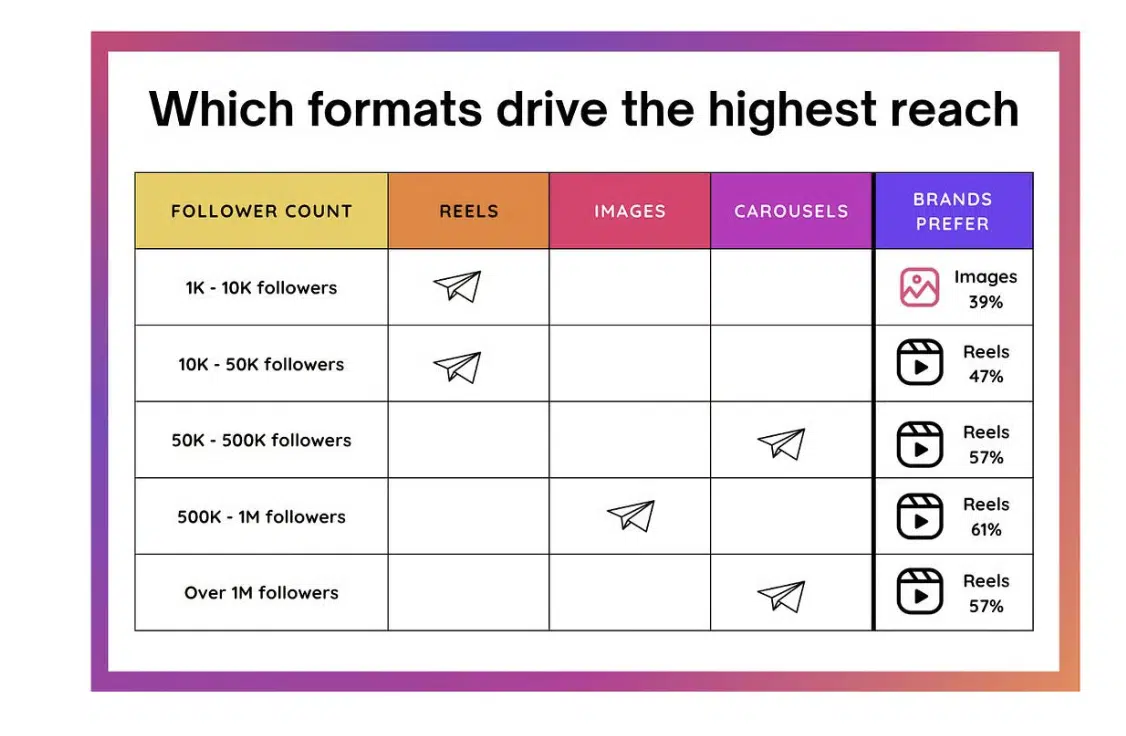
(GARDER l'image existante : Un graphique montrant que les bobines ont la plus grande portée sur la plupart des comptes de followers, les marques préférant les bobines (57-61%) aux images (39%) et aux carrousels).
Le contrôle des algorithmes change tout
Les utilisateurs ayant désormais la possibilité d'affiner ce qu'ils voient grâce à la fonction “Votre algorithme”, les créateurs ne peuvent plus compter sur le hasard.
Votre contenu devra avoir un sujet clair, une cohérence esthétique et des accroches fortes pour rester visible dans les flux personnalisés.
Ce que les spécialistes du marketing devraient faire ensuite
- Audit de votre contenu - 60% Bobines, 25% Carrousels, 15% Histoires
- Investir dans les canaux de diffusion pour créer des audiences fidèles dans les messages instantanés
- Optimiser les interactions répétées - commentaires, sauvegardes, partages
- Utiliser les nouvelles invites de Reels pour savoir ce que votre public choisit de regarder
- Contrôler les analyses chaque semaine - s'attendre à des variations de performances au fur et à mesure que la nouvelle interface utilisateur sera déployée à l'échelle mondiale
- Testez la fonction “Votre algorithme comprendre comment les utilisateurs peuvent personnaliser leur expérience
Questions fréquemment posées sur la mise à jour de l'interface utilisateur d'Instagram
Pourquoi ma mise en page Instagram a-t-elle changé ?
Instagram déploie progressivement une nouvelle interface qui hiérarchise les Reels et les DM en se basant sur les données de comportement des utilisateurs. La plateforme a constaté que les utilisateurs passaient le plus clair de leur temps dans ces zones, et a donc réorganisé la navigation pour les rendre plus accessibles.
Comment obtenir la nouvelle interface utilisateur d'Instagram ?
Assurez-vous que votre application est mise à jour avec la dernière version. Instagram déploie la nouvelle interface utilisateur par phases, il se peut donc que vous receviez bientôt une invitation à l'essayer. Certains utilisateurs peuvent y accéder via le menu des paramètres.
Puis-je revenir à l'ancienne interface d'Instagram ?
Actuellement, une fois que vous avez basculé vers la nouvelle interface utilisateur, Instagram n'offre pas d'option pour revenir en arrière de manière permanente. La plateforme est conçue autour de la nouvelle navigation.
Pourquoi mon Instagram est-il différent de celui de mes amis ?
Instagram teste les fonctionnalités auprès de différents groupes d'utilisateurs avant de les déployer à l'échelle mondiale. Votre ami fait peut-être partie d'un groupe de test différent ou d'une région géographique qui a reçu la mise à jour plus tôt ou plus tard.
Qu'est-ce que la fonction “Votre algorithme” ?
Il s'agit d'un nouvel outil de personnalisation qui vous permet de contrôler les types de bobines qui apparaissent dans votre flux. Vous pouvez spécifier les sujets que vous souhaitez voir plus ou moins, ce qui vous permet de mieux contrôler votre expérience du contenu.
À emporter
La nouvelle interface utilisateur d'Instagram marque le début d'une nouvelle phase de l'économie des créateurs, dans laquelle la conversation remplace le défilement du fil d'actualité et la personnalisation remplace la découverte passive.
Comme l'a dit Adam Mosseri, il s'agit de “rendre Instagram plus personnel”.”
Pour les créateurs et les marques, il s'agit également de rendre la stratégie plus intentionnelle.
Ceux qui s'adaptent le plus rapidement - en équilibrant les bobines pour la portée, les carrousels pour la connexion et les DM pour la fidélité - garderont une longueur d'avance sur l'algorithme, quelle que soit la fréquence à laquelle l'interface utilisateur est modifiée.